Skip to content
Work02 / 09

Saara

Designing and building occupational health AI

Saara is an AI documentation platform for occupational health teams. A fitness-for-duty visit becomes a signed form, a work disposition report, and an employer letter.

Role
Product DesignDevelopmentUser Research
Skills
Product DesignDesign SystemsFront-end EngineeringUser Research
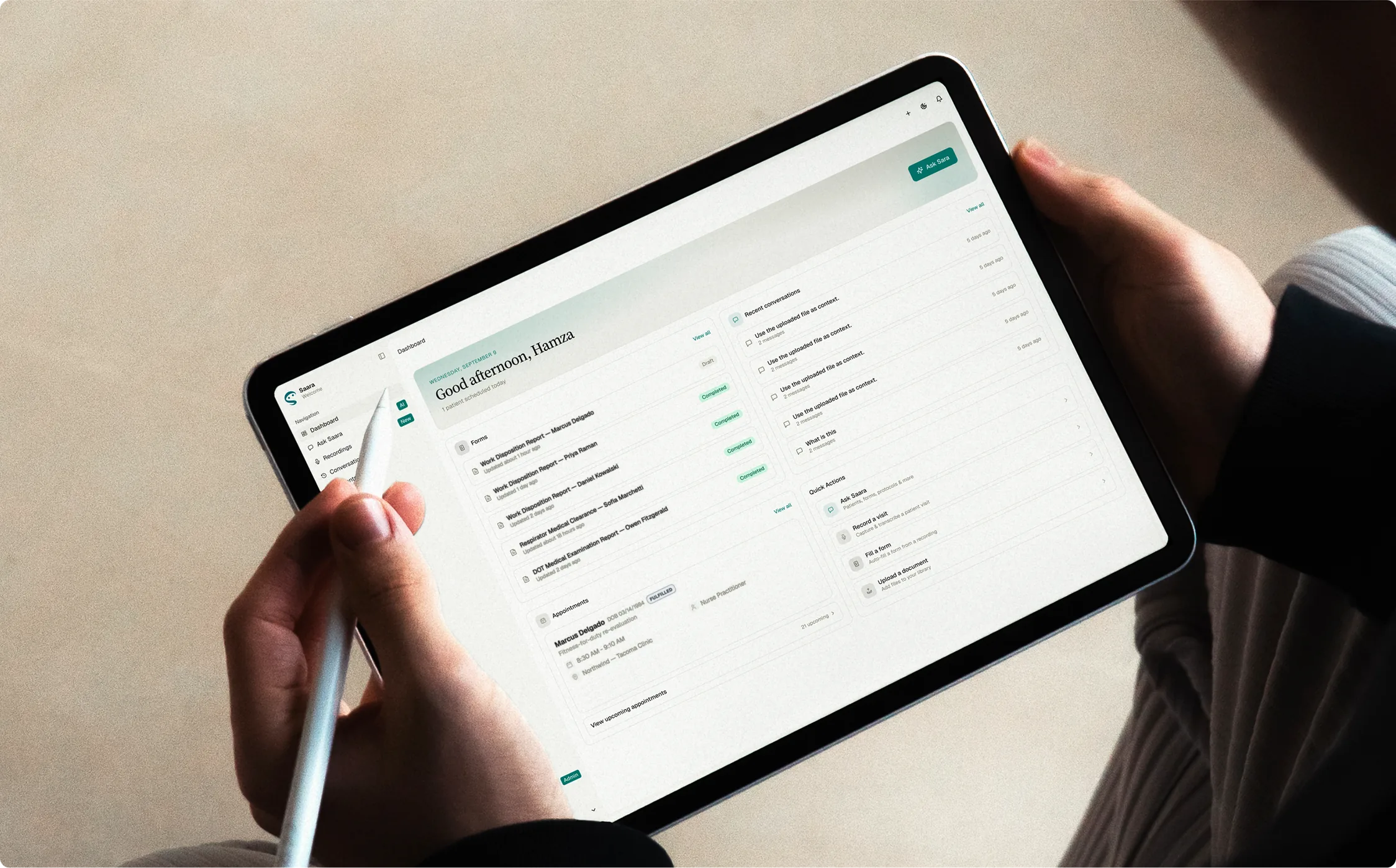
Hands holding an iPad and Apple Pencil with Saara's dashboard open: Good afternoon, Hamza, a forms list of work disposition reports, a respirator clearance and a DOT exam, recent conversations, and a fitness-for-duty re-evaluation in today's appointments

Overview

Overview

I joined Saara when the product was an early prototype. I started with its design language, then became the primary builder as we focused on occupational health.

Our first design partner, an occupational-health provider group, needed ten capabilities for a July alpha. I mapped their workflow end to end, from the exam room to the letter an employer receives.

Ask Saara records the visit, turns it into a structured note and fills the form, showing where every value came from. The provider confirms it’s accurate and signs. The employer letter is drafted from that signed form, never the raw recording.

Final designs

Opportunity

A fitness-for-duty exam ends in three documents that share most of their facts, so one verified form could produce the rest. If the visit itself filled that form, providers would review instead of write.

Click a frame to zoom to it, drag to move, Ctrl or ⌘ + scroll to zoom; arrow keys pan, + and − zoom, 0 fits.

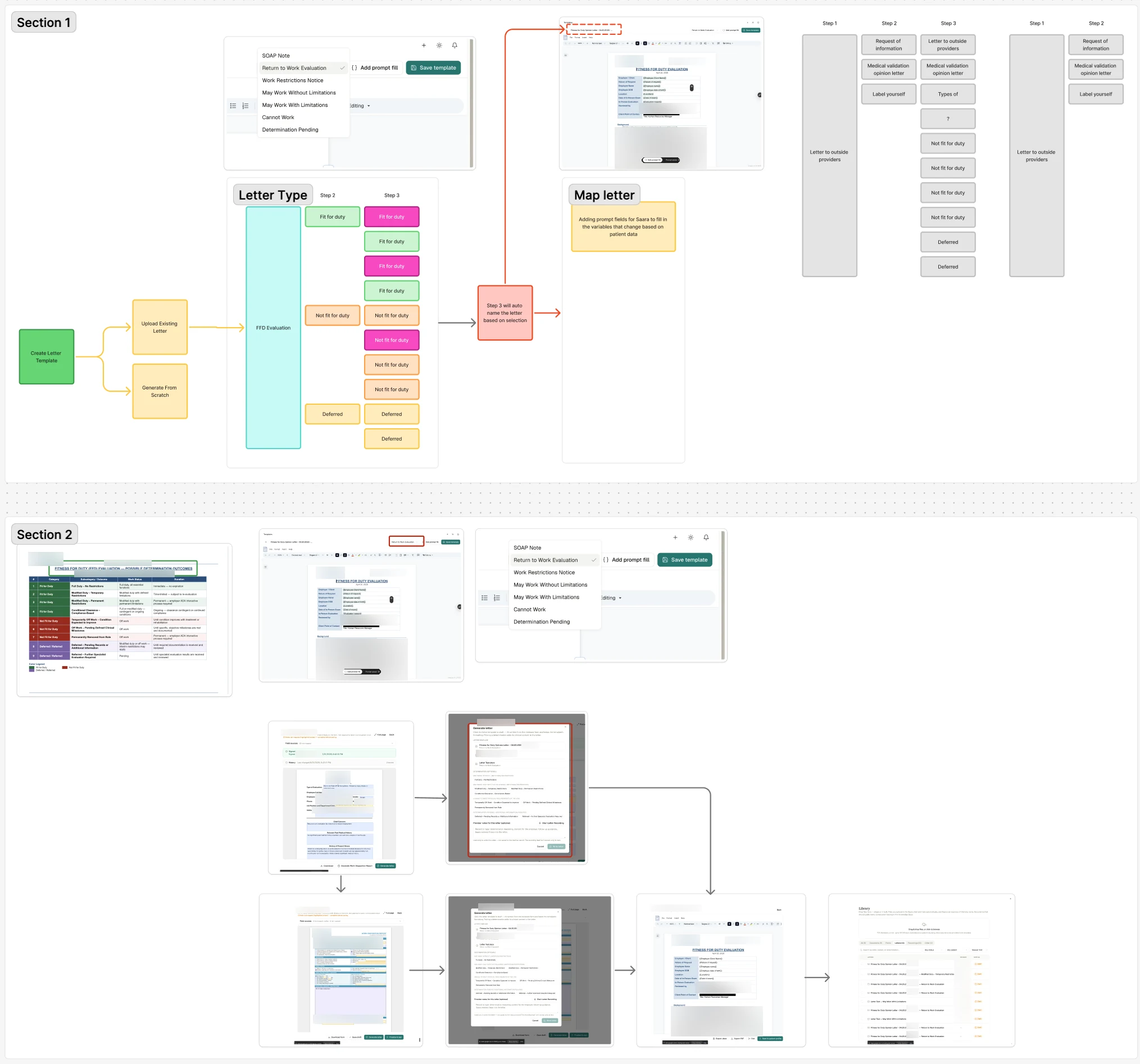
On my whiteboard, I mapped the letter flow from the clinic’s template to a letter that names itself.

Problem

A fitness-for-duty (FFD) exam decides an employee’s work status and any restrictions. Each one ends in three documents: a detailed form, a work disposition report with that outcome, and a letter for the employer. Providers typed them all up long after the exam.

Any AI filling them in had to be trustworthy: one wrong restriction on an employer letter is a liability.

Each gap in the table names the part of Saara that closes it.

  1. Paperwork typed up after the visit

    Providers wrote all three documents by hand after the exam.

    Partner workflow map
  2. The same facts, typed three times

    Each document retyped facts the others already held.

    Partner workflow map
  3. Trust broke on one false claim

    Trust broke fastest when the AI said it did something it hadn’t.

    Design-partner testing
  4. Long step-by-step flows lost people

    Clinic staff started without instruction. One “what next?” choice kept them moving.

    Design-partner testing
  5. The signers were nurse practitioners

    A separate clinician review went unused, so reviewing and signing had to be one step.

    Design-partner testing

Solution

The work splits into six features. Pick one to see its final design, how each flow got there, the prototype and the research.

01 / 06

Record, fill and sign

I designed and built Saara's core loop for fitness-for-duty visits: record from chat, get a drafted note, fill the work disposition report with every value sourced, then attest, sign and lock it.

  1. Review and sign, at iPad width

The problem

Each fitness-for-duty exam left the provider three documents to type by hand, long after it ended: the detailed form, the work disposition report and the employer letter. Any AI filling them had to earn trust, because the provider signs for every value.

Before
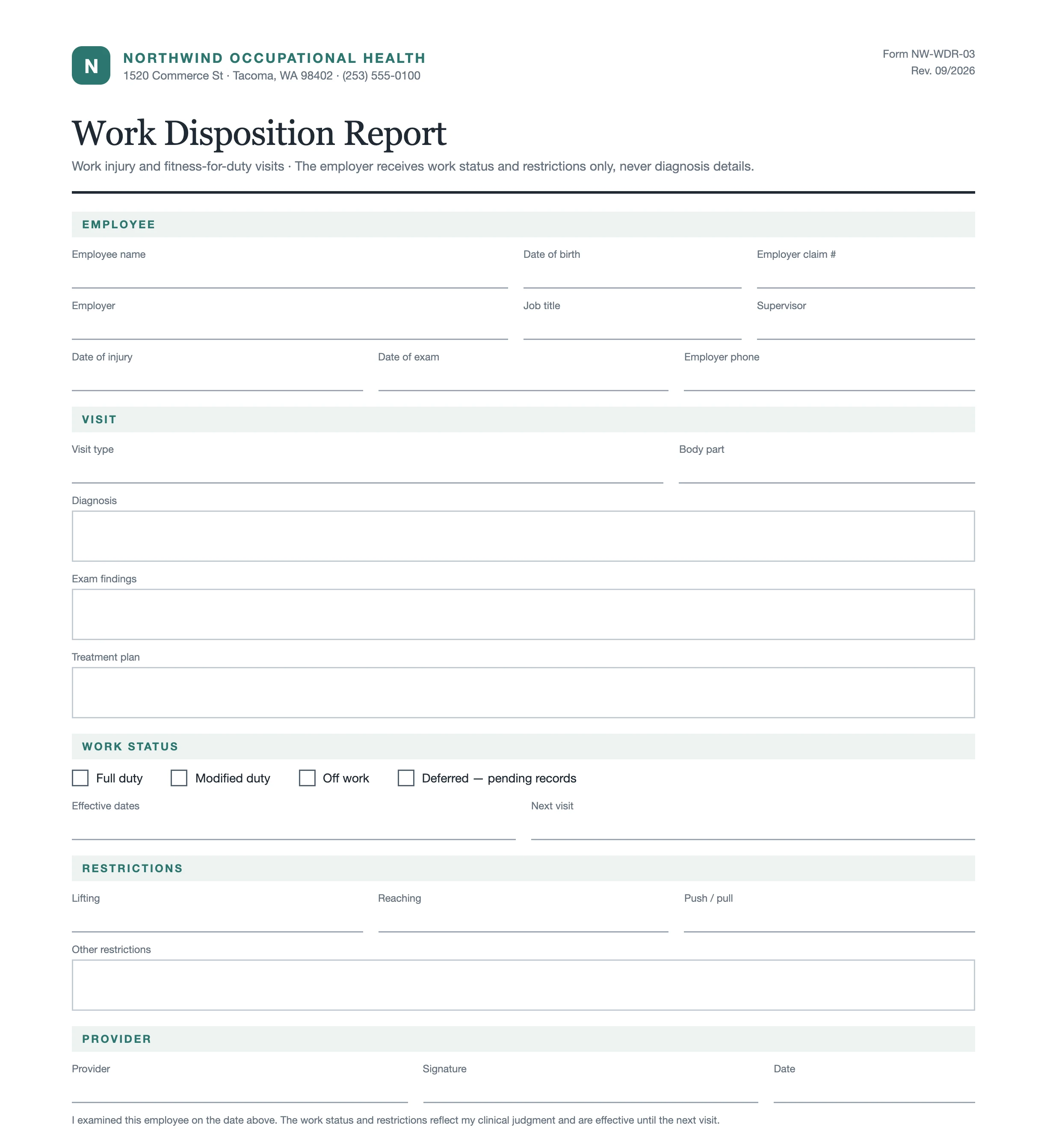
A demo clinic's blank work disposition report: work status, restrictions and signature, all typed by hand.

What shipped

Decision
Every filled value names its source; anything Saara can't map stays empty and amber.
Trade-off
Trust over full automation: the provider completes the gaps and attests before Sign & apply unlocks.
Result
54 of 54 form fills finished, about 31 seconds each; partner users returned in 7 of 11 weeks.
  1. 01Record the visit, pick the form, sign it

  2. 02A note headed by what was discussed

  3. 03A correction as a signed addendum

  4. 04Ready to sign, in dark mode

Component anatomy

Each piece numbered beside the component, then where else it is used.

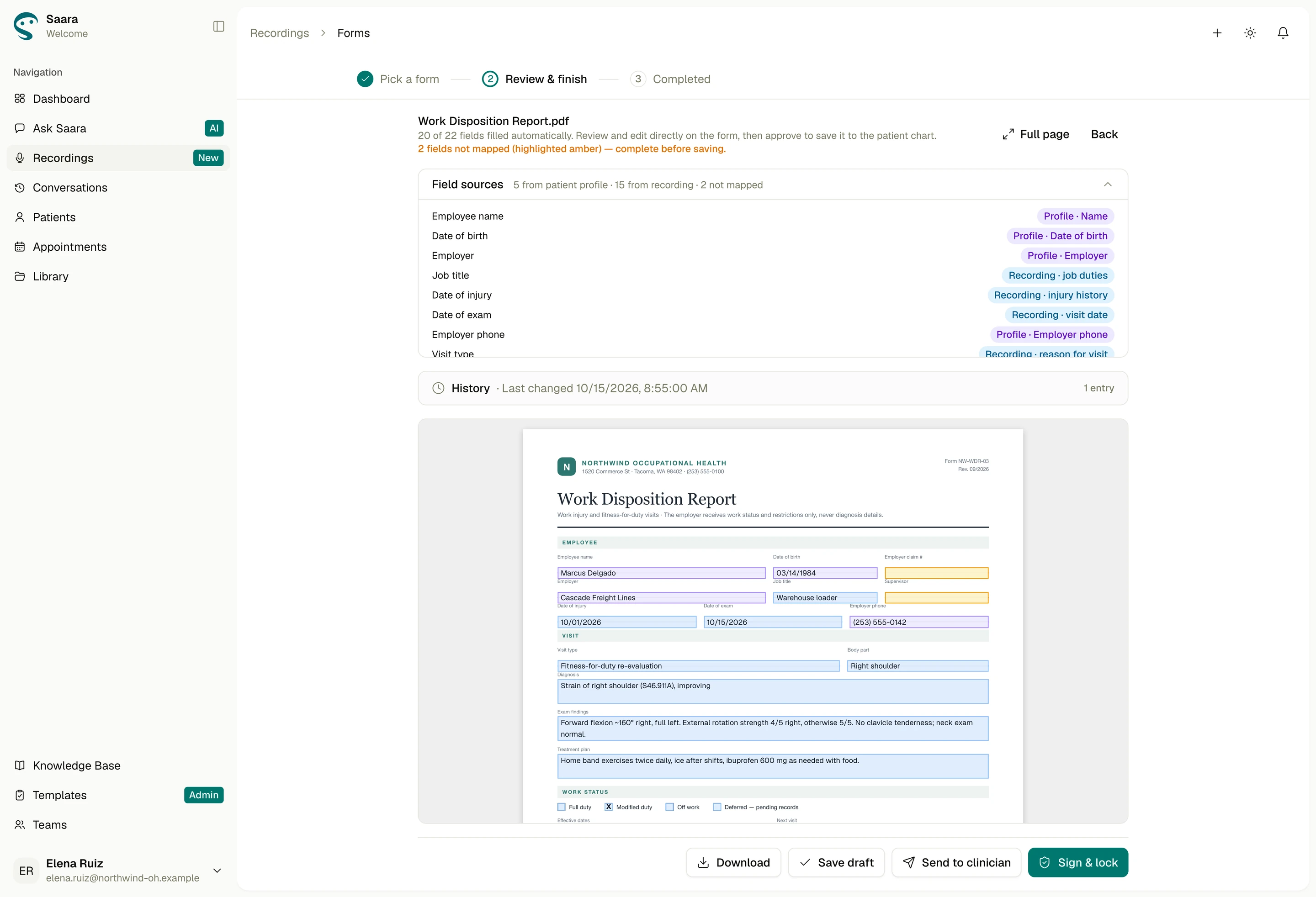
Field sources
Shipped
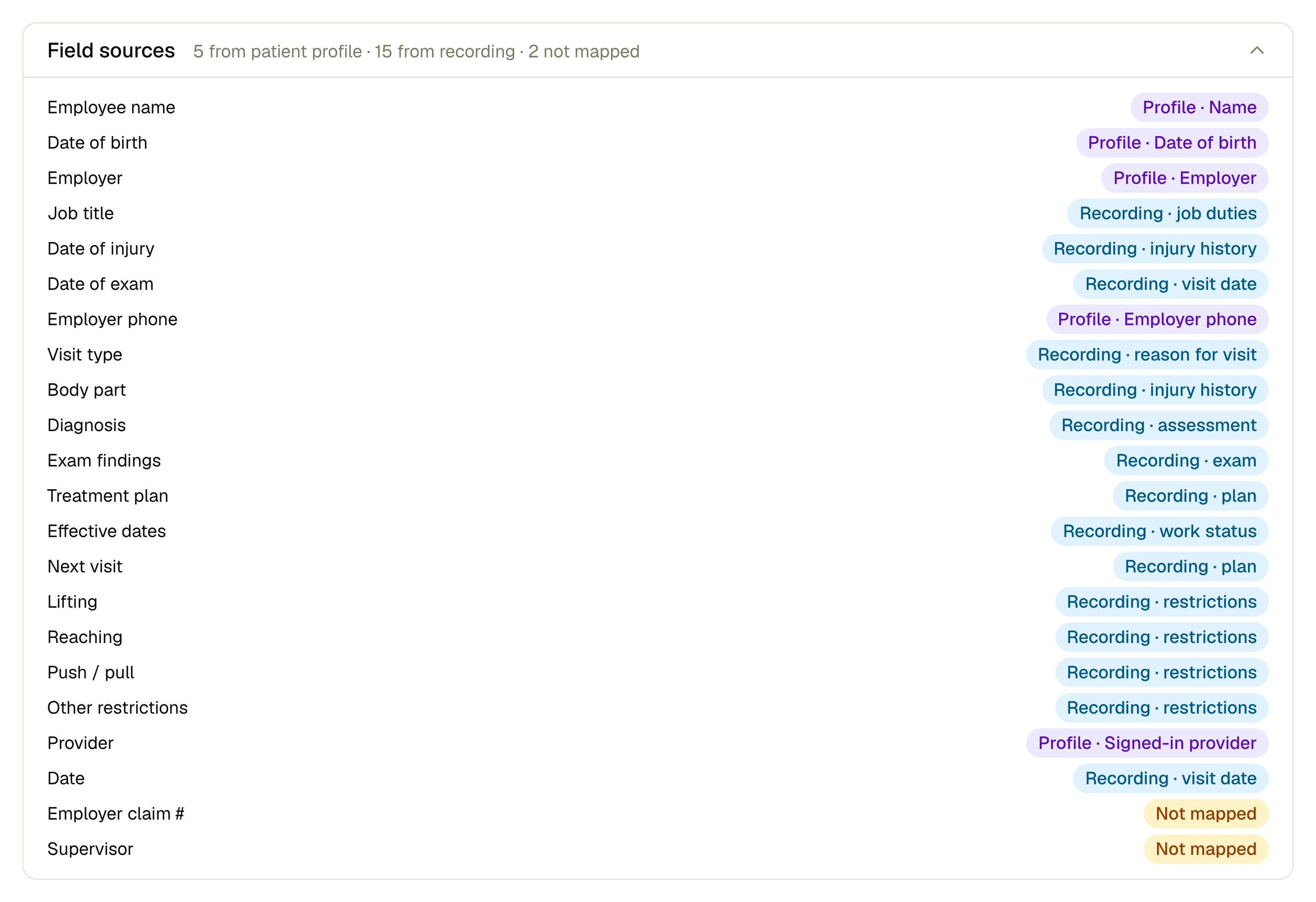
Field sources: 1 Header, 2 Collapse, 3 Field names, 4 Profile tag, 5 Recording tag, 6 Not mapped
  1. HeaderField sources: 5 from patient profile, 15 from recording, 2 not mapped
  2. CollapseA chevron folds the list away
  3. Field namesEvery field on the form, by its name
  4. Profile tagViolet: from the patient profile, like Profile · Date of birth
  5. Recording tagBlue: from the visit, like Recording · job duties
  6. Not mappedAmber: Employer claim # and Supervisor, left to fill

Where it’s used

  1. Review & finish: Field sources open above the report, its two gaps in amber
  2. Folded, the panel keeps its count above the Work Disposition Report

How we got there

Earlier rounds, oldest first, then what shipped and any later pass. Open any screen full size, or step through the flow.

Flow 1 of 6

Record the visit from chat

Moving to any other page in Saara ended a recording in progress.

How does the provider start recording in the exam room, tied to the right employee, and keep it running while they check the chart?

  1. Shipped
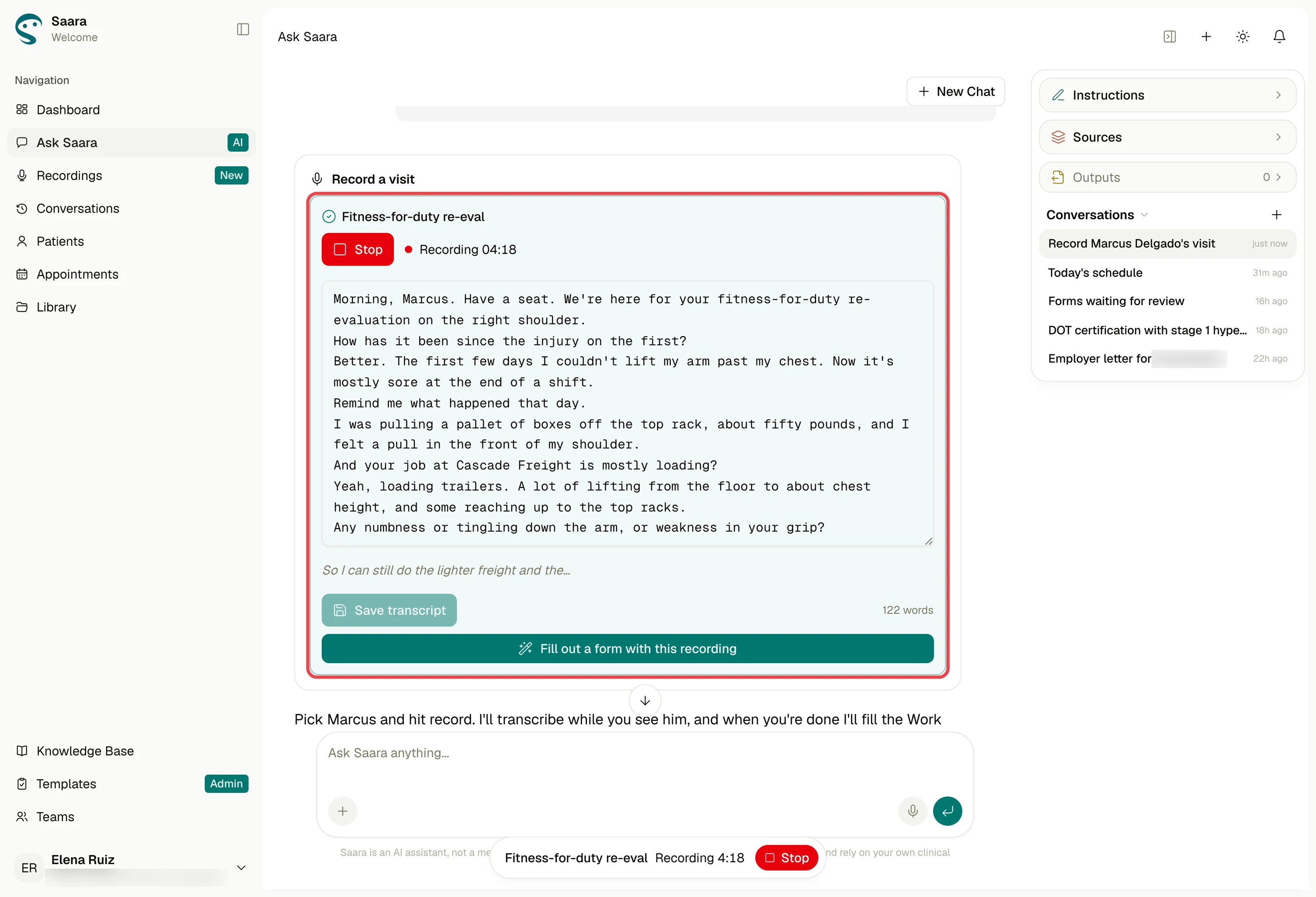
    Recording in the chat: a live timer, Stop, and the transcript filling in as they talk.
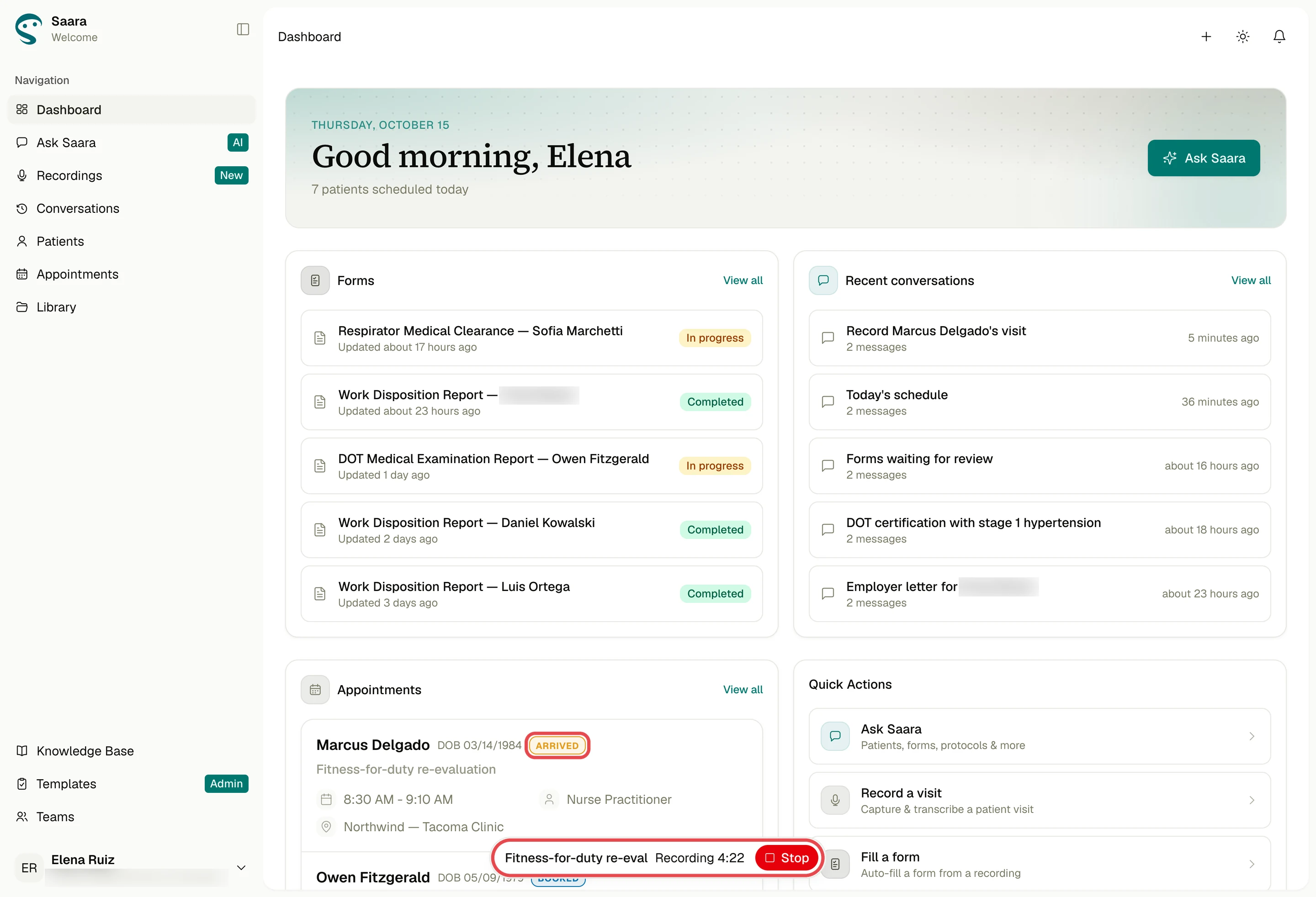
    Asking Saara to record opens a recorder card in the chat, with the employee already picked and an occupational visit reason. The transcript builds live. Leave for the chart or schedule and a floating pill keeps recording on every page; click to open it, or stop from anywhere.
  2. Mid-visit on the dashboard, recording continues in a floating pill with its timer and Stop.

What landedAsking Saara to record opens a recorder card in the chat, with the employee already picked and an occupational visit reason. The transcript builds live. Leave for the chart or schedule and a floating pill keeps recording on every page; click to open it, or stop from anywhere.

Flow 2 of 6

The note writes itself

The first version drafted a SOAP note (Subjective, Objective, Assessment, Plan) into four fixed boxes.

How does a long, unstructured transcript become a note shaped like the visit, one the provider can correct without Saara overwriting their edits?

  1. The first version drafted a SOAP note (Subjective, Objective, Assessment, Plan) into four fixed boxes. I replaced them with a summary headed by what was actually discussed; older SOAP notes open as headed sections.
  2. Shipped
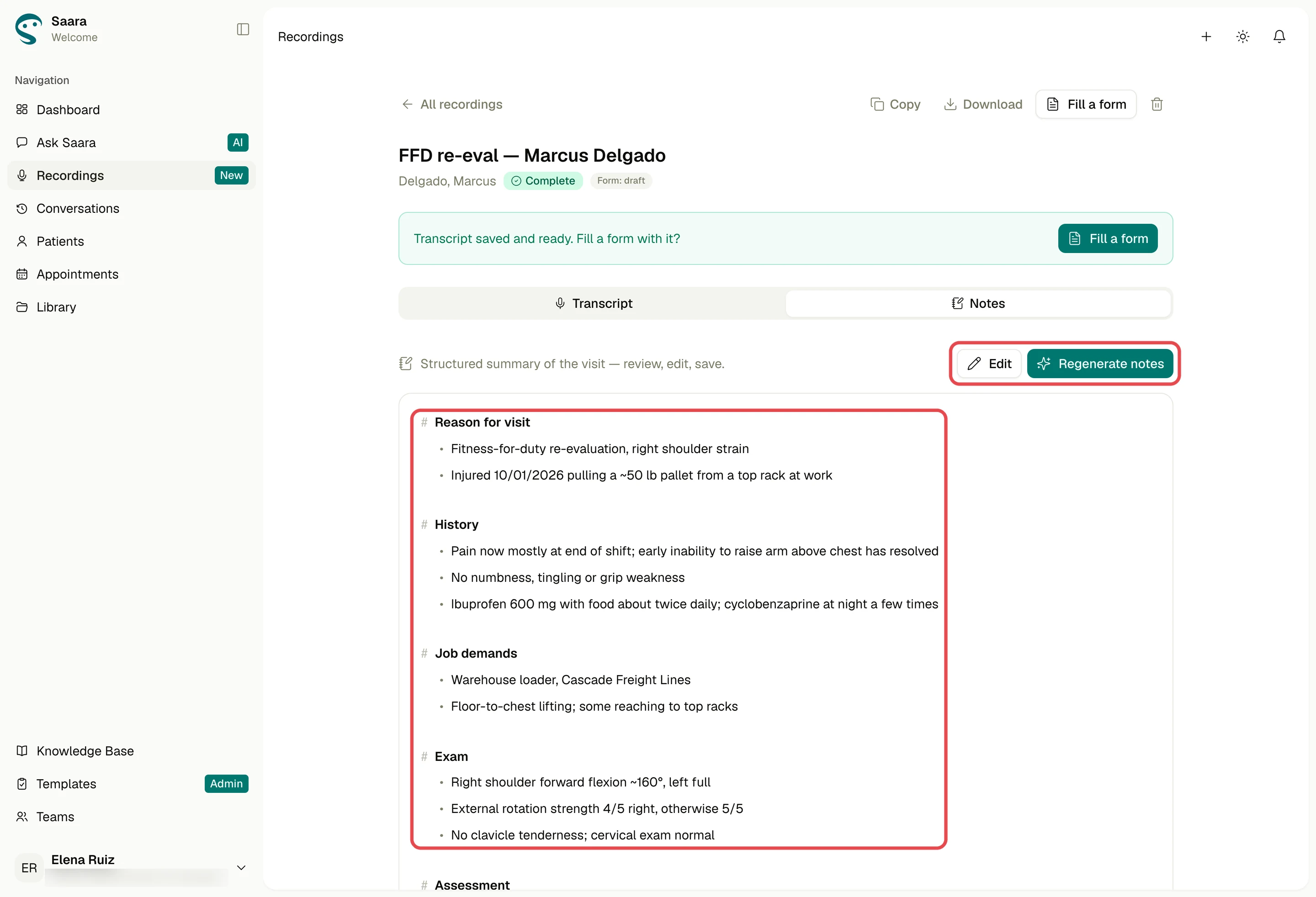
    The shipped note: Reason for visit, History, Job demands and Exam as headed bullets.
    The note drafts itself from the transcript when the tab first opens, headed by what was discussed, here job demands and the exam. Regenerate asks before replacing anything, nothing saves until Save notes, and form fills and letters read this note.
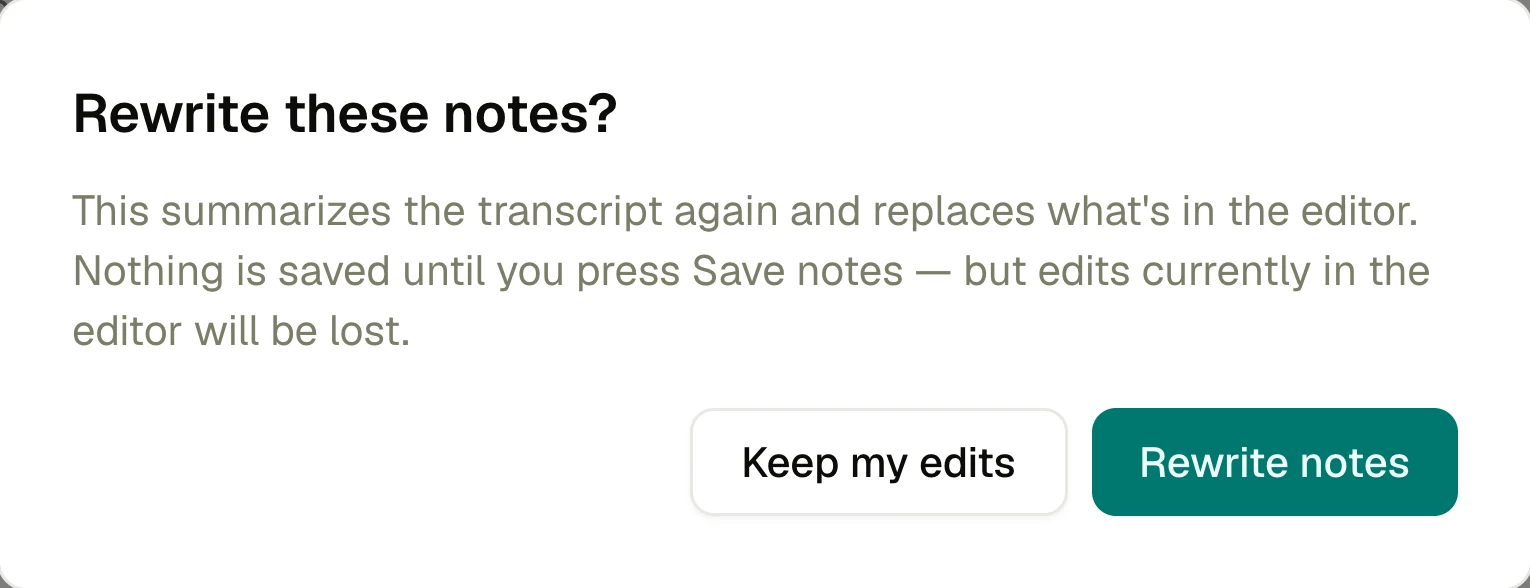
  3. Regenerate asks 'Rewrite these notes?' first, with Keep my edits one click away.

What changedThe note drafts itself from the transcript when the tab first opens, headed by what was discussed, here job demands and the exam. Regenerate asks before replacing anything, nothing saves until Save notes, and form fills and letters read this note.

Flow 3 of 6

From recording to the right form

Our bug list flagged a dead “0 fields” row in the chat's form picker for forms nobody had mapped yet.

Once the visit is saved, how does the provider reach the right form in one move, and know up front which forms Saara can fill?

What landedEvery saved recording offers one next step: Fill out a form with this recording. The picker already holds the recording, so it asks only which form. Each form shows how many fields Saara can fill; a form with none stays selectable as a manual fill, completed by hand in review.

Flow 4 of 6

Every value shows its source

Trust broke fastest when the AI said it did something it hadn't.

When Saara fills a work disposition report, how does the provider see which values came from the profile, which from the visit, and what's left?

  1. Shipped
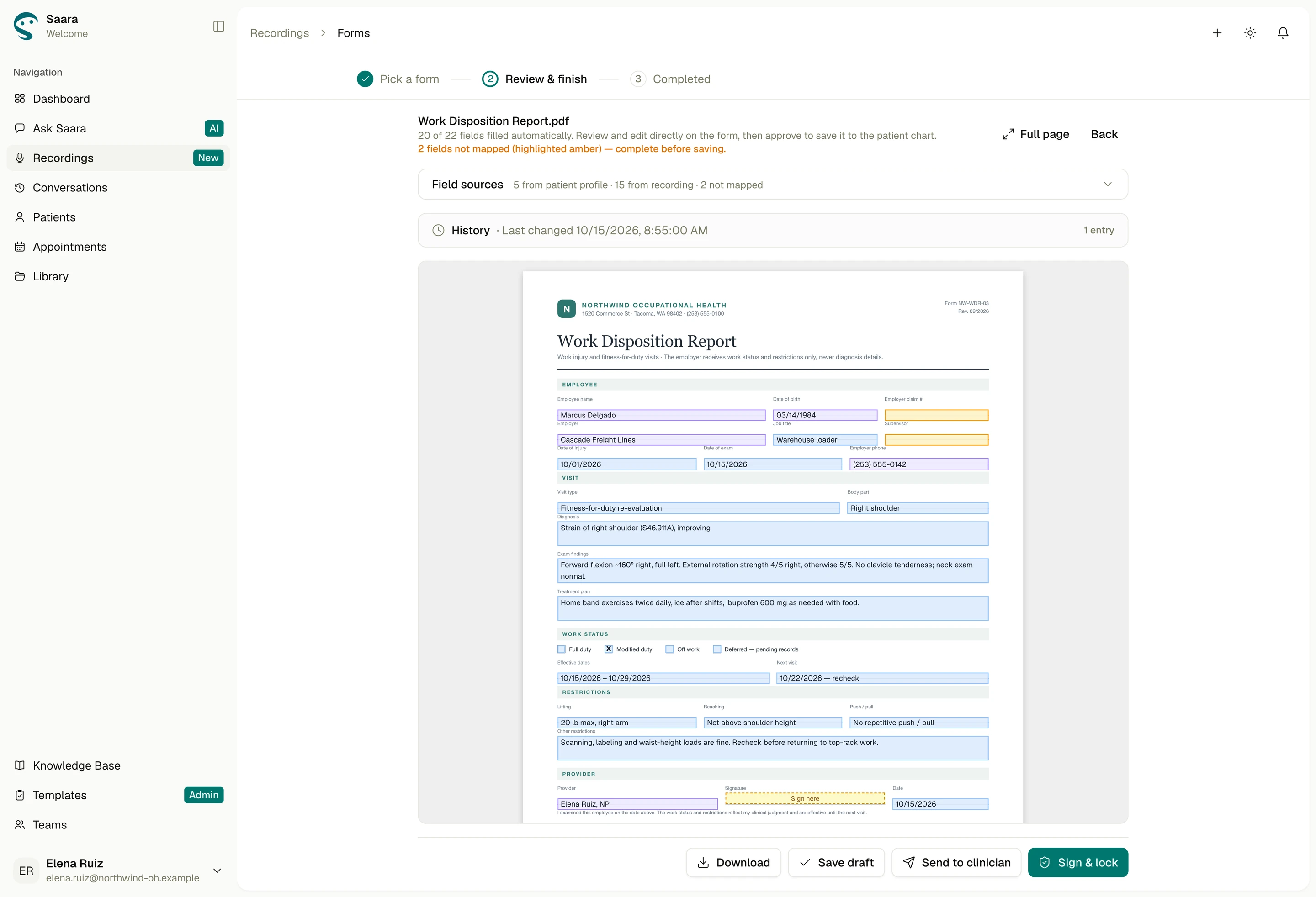
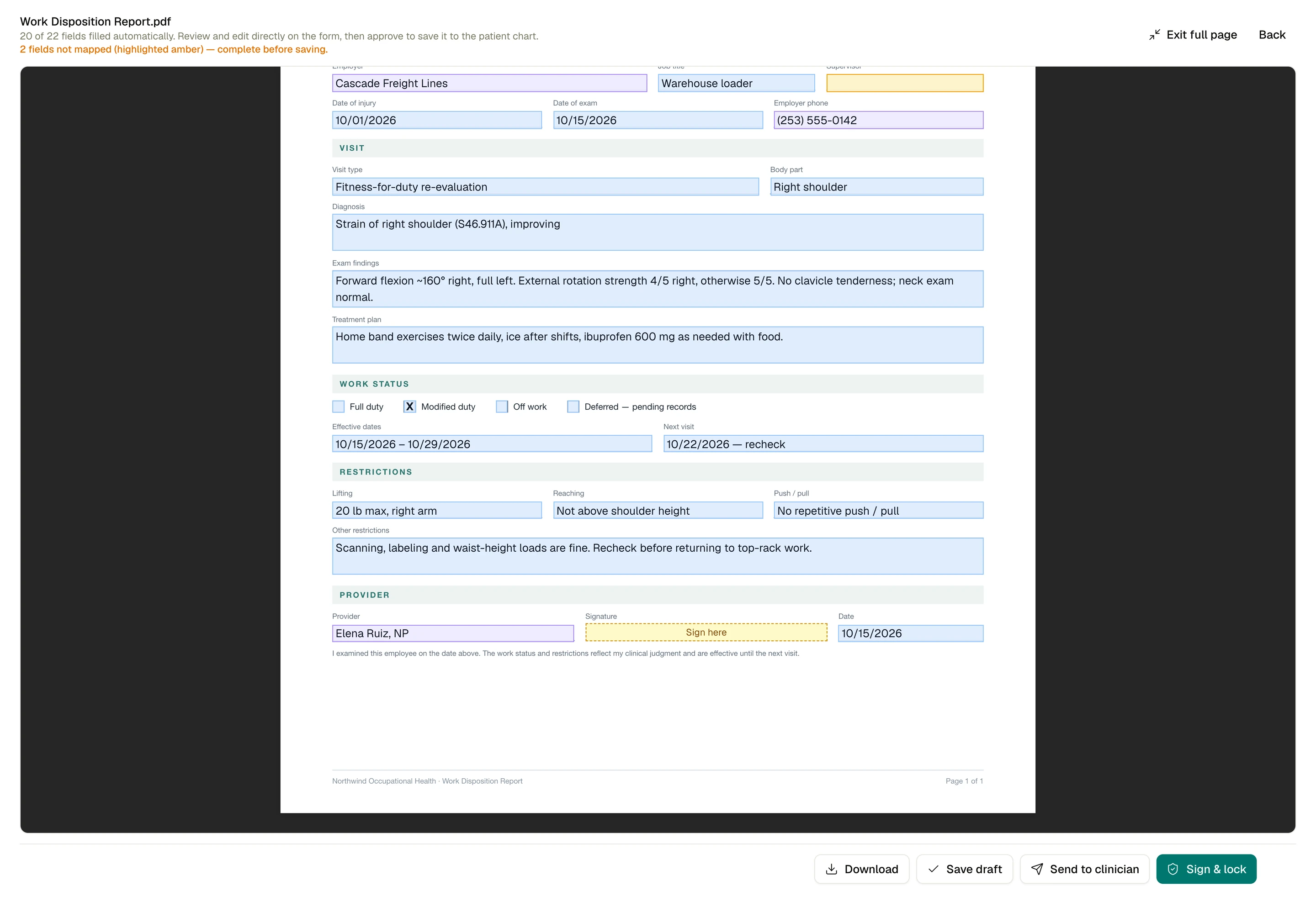
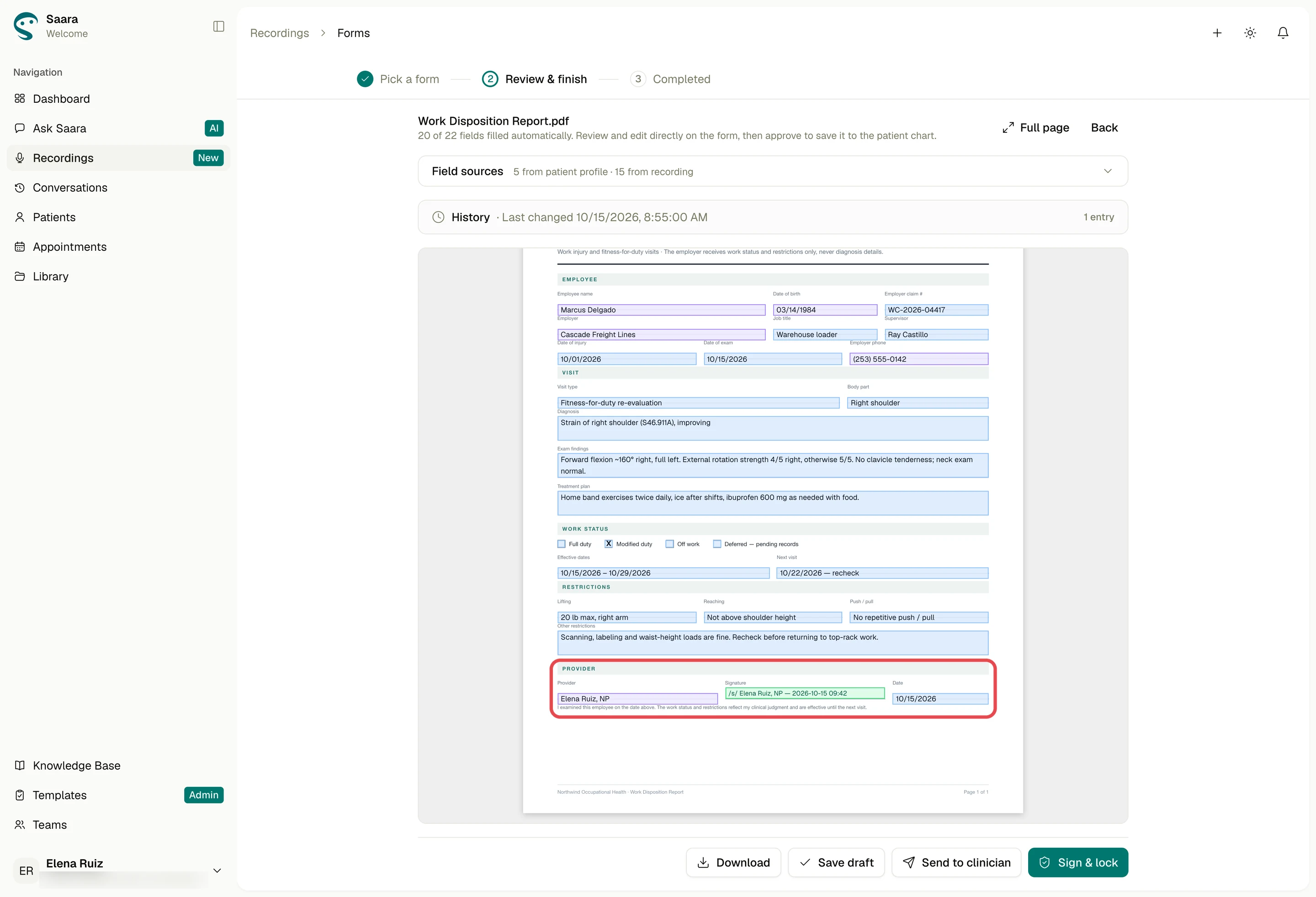
    Full-page view for a final read: work status, restrictions and the Sign here box.
    Every value names its source: Profile · Date of birth, Recording · job duties. Violet marks profile values, blue the recording. Anything Saara couldn't map stays empty and amber, and the header counts it: 20 of 22 filled, 2 to complete before saving. Dates and vitals always show as written.

What landedEvery value names its source: Profile · Date of birth, Recording · job duties. Violet marks profile values, blue the recording. Anything Saara couldn't map stays empty and amber, and the header counts it: 20 of 22 filled, 2 to complete before saving. Dates and vitals always show as written.

Flow 5 of 6

Fill the gaps, then sign

Nurse practitioners sign these reports, and one wrong restriction is a liability.

How do they complete the blanks, own every value, and lock the report?

  1. Shipped
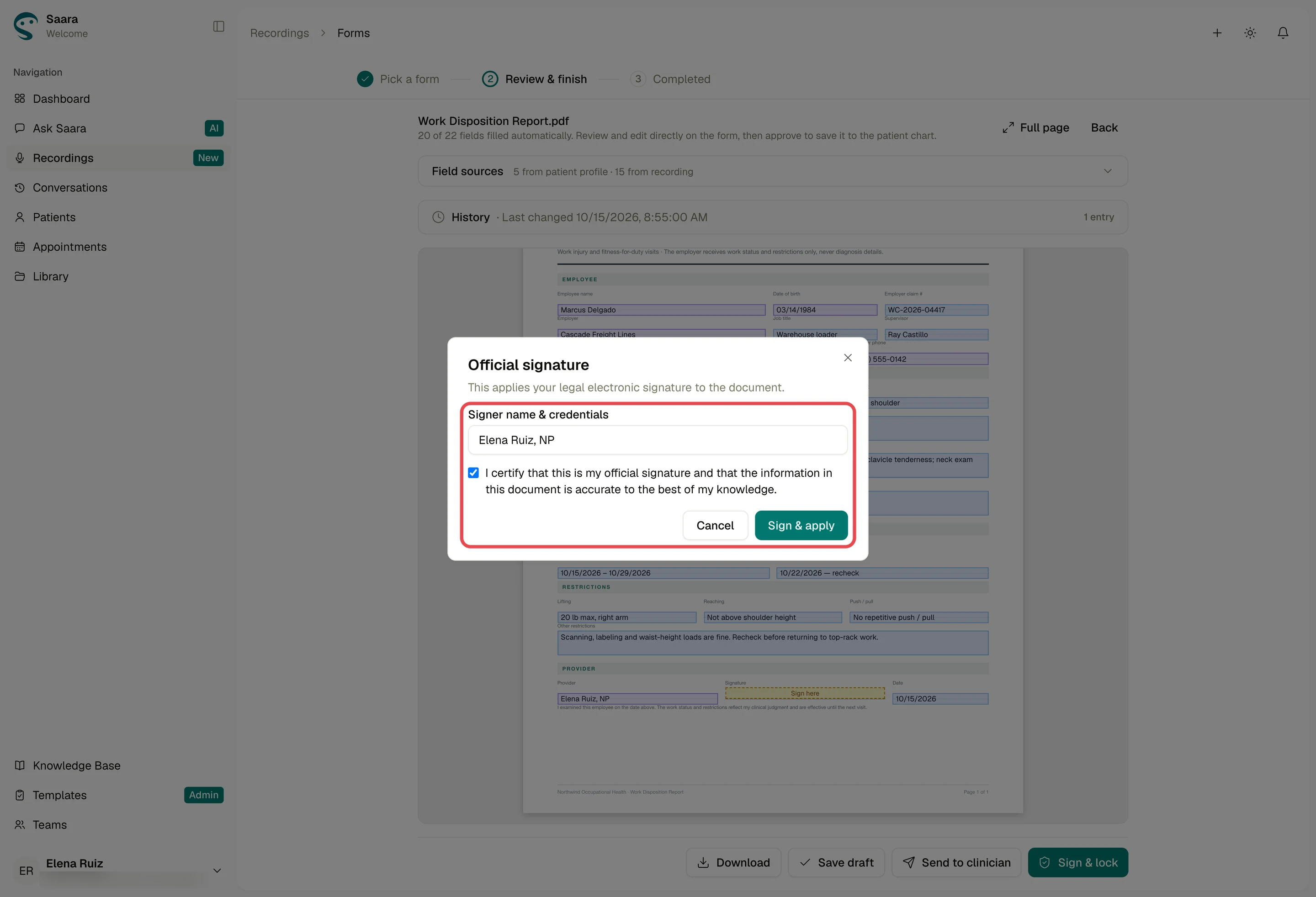
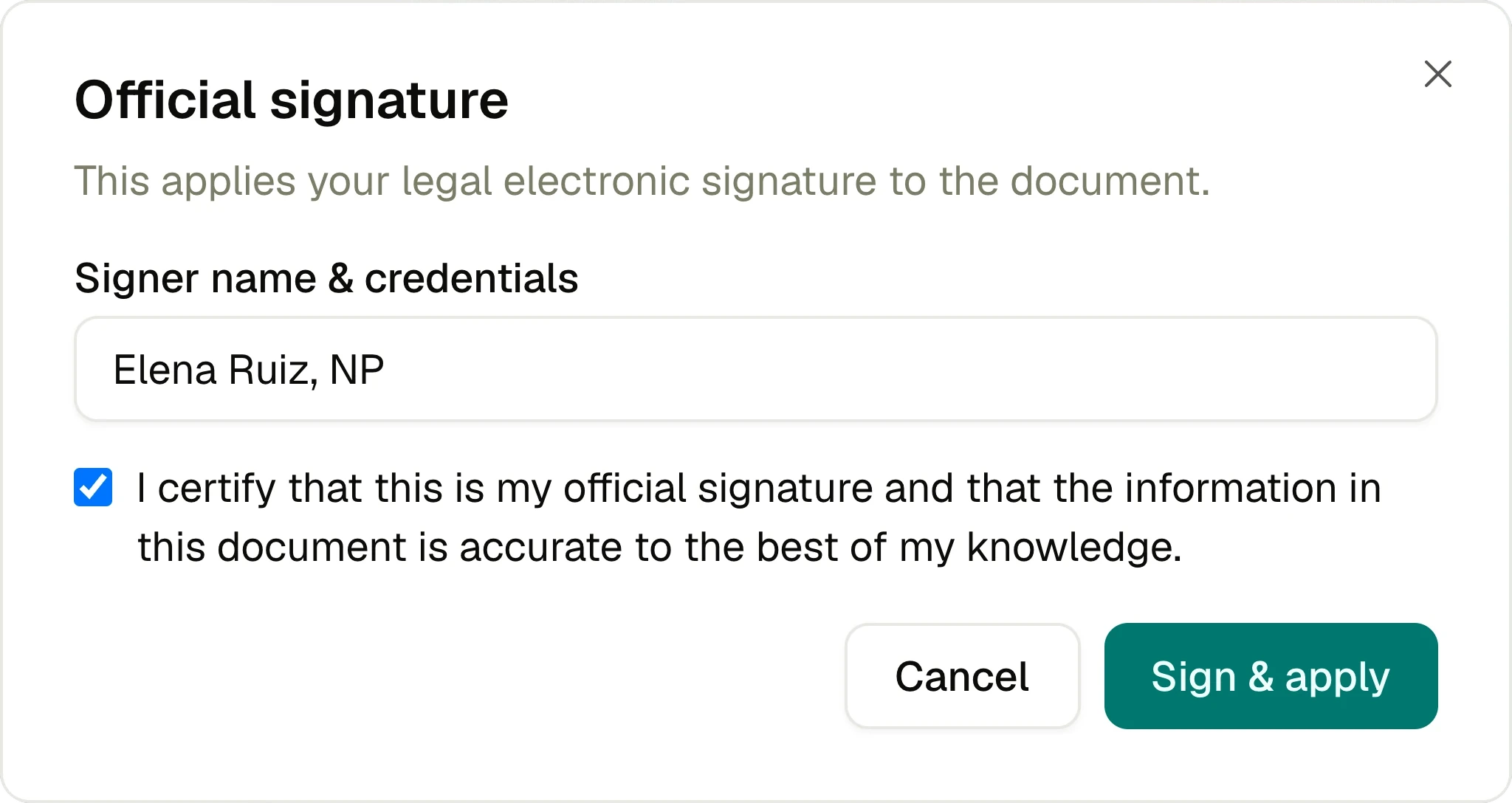
    Official signature dialog: name, credentials, and an accuracy attestation ticked before Sign & apply.
    Amber fields are edited right on the form. Sign & lock asks for the signer's name, credentials and an explicit attestation that it's accurate; Sign & apply stays off until it's ticked. The signature is stamped with the time, and the signed form keeps its values when reopened or downloaded.
  2. The signature stamped in green on the Provider row, with the signer's name, credentials and time.

What landedAmber fields are edited right on the form. Sign & lock asks for the signer's name, credentials and an explicit attestation that it's accurate; Sign & apply stays off until it's ticked. The signature is stamped with the time, and the signed form keeps its values when reopened or downloaded.

The parts

Official signature
Shipped
Official signature: 1 Title, 2 Legal line, 3 Signer, 4 Attestation, 5 Cancel, 6 Sign & apply
  1. TitleOfficial signature
  2. Legal lineThis applies your legal electronic signature to the document
  3. SignerSigner name & credentials, filled: Elena Ruiz, NP
  4. AttestationTicked: my official signature, accurate to the best of my knowledge
  5. CancelBack to the form, unsigned
  6. Sign & applySigns and locks the report, on once the box is ticked

Flow 6 of 6

Signed, locked, still correctable

Once signed, the report joins the employee's record.

How does the provider know it landed, and fix a mistake later without rewriting what they signed?

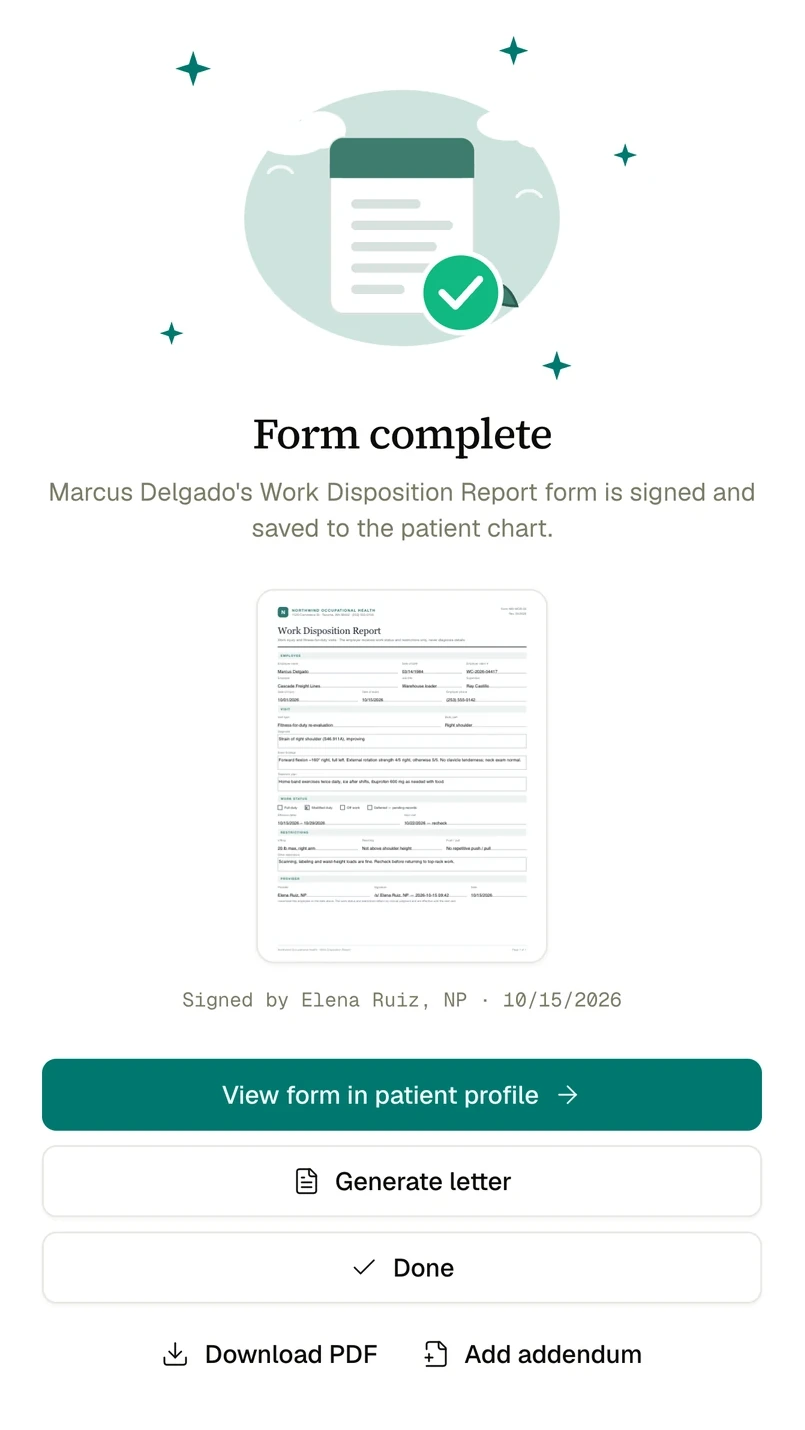
  1. I shipped a temporary picker that cycled four illustrations on the success screen. The soft scene won the same afternoon, and I deleted the other three.
  2. Shipped
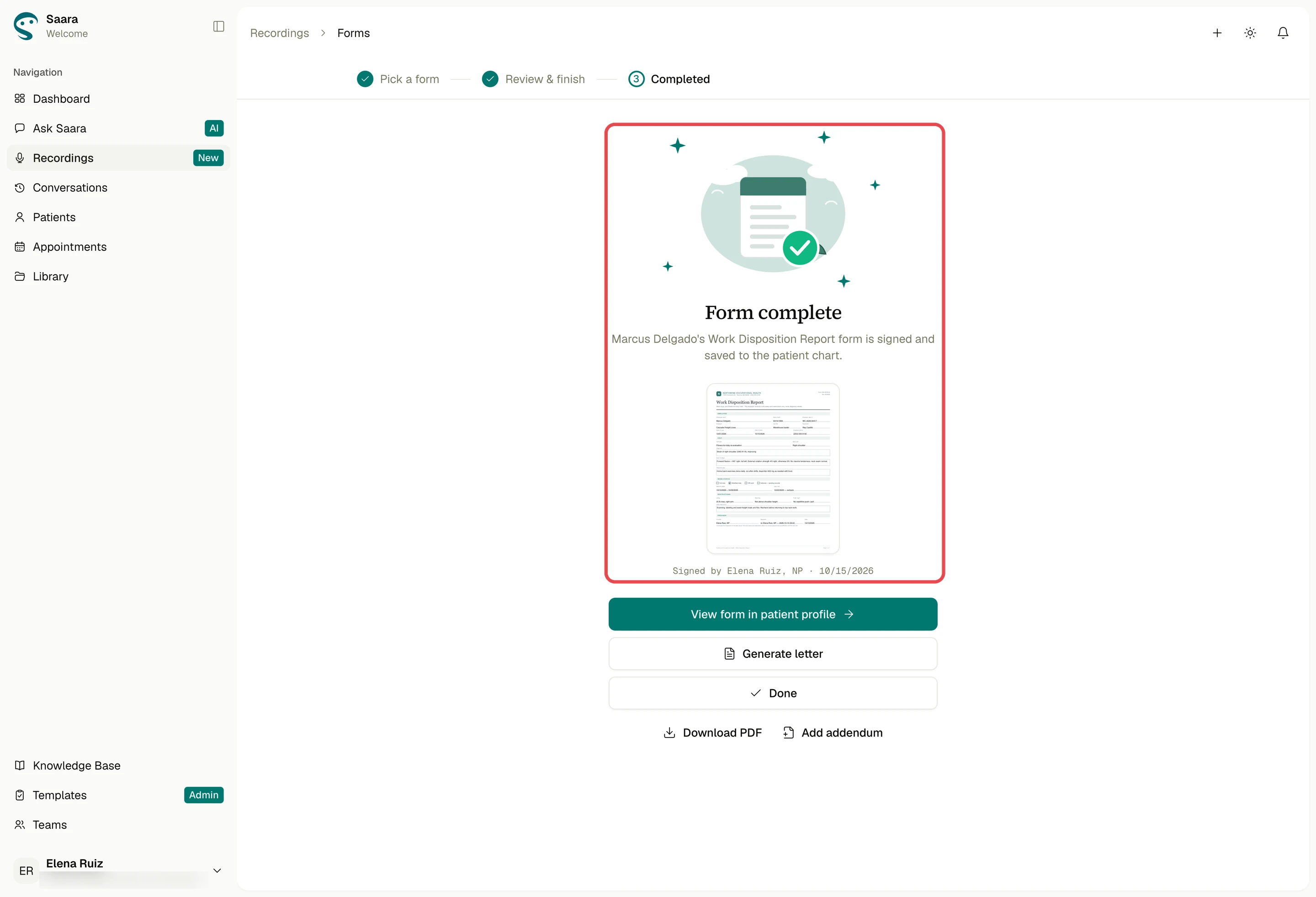
    Form complete: the soft-scene illustration, a thumbnail of the signed report and who signed it.
    Signing ends on Form complete, confirming the report is signed and saved to the patient chart, with a thumbnail of the signed PDF, the signer, and View form in patient profile. A later correction is an addendum, a new signed, dated page, never an edit to the signed content.

What changedSigning ends on Form complete, confirming the report is signed and saved to the patient chart, with a thumbnail of the signed PDF, the signer, and View form in patient profile. A later correction is an addendum, a new signed, dated page, never an edit to the signed content.

The parts

Form complete
Shipped
Form complete: 1 Illustration, 2 Title and line, 3 Signed PDF, 4 Signer, 5 View form, 6 Generate letter, 7 Add addendum
  1. IllustrationThe soft scene: a signed form, checked, under sparkles
  2. Title and lineForm complete: signed and saved to the patient chart
  3. Signed PDFA thumbnail of the signed Work Disposition Report
  4. SignerSigned by Elena Ruiz, NP · 10/15/2026
  5. View formView form in patient profile, the one filled button
  6. Generate letterStraight on to the employer letter
  7. Add addendumA later correction, beside Download PDF

Prototype

Ask Saara to record the visit. The transcript builds live, and a pill keeps it running on any page. Stop, and Saara drafts the visit note. Pick a form and it fills from the recording and the employee's profile. Check where each value came from and complete the amber fields. Attest and sign. The locked report lands on the employee's chart.

Research

I tested with our design partner and a clinic tester, worked through their QA punchlists and our bug list, and reviewed builds on my whiteboard. The flow only clicked once we broke it into smaller steps.

  1. A long flow lost people

    Clinic staff started without instruction. A long step-by-step flow lost them; one “what next?” choice kept them moving.

    Usability tests Once the visit is saved, how does the provider reach the right form in one move, and know up front which forms Saara can fill?
  2. False claims broke trust fastest

    Trust broke fastest when the AI said it did something it hadn't.

    Usability tests When Saara fills a work disposition report, how does the provider see which values came from the profile, which from the visit, and what's left?
  3. Filled values looked empty

    In partner QA, date and number inputs silently hid values that didn't match their strict format, so filled vitals and dates looked blank.

    Partner QA When Saara fills a work disposition report, how does the provider see which values came from the profile, which from the visit, and what's left?
  4. Leaving the page ended the visit

    Moving to any other page in Saara ended a recording in progress.

    QA punchlist How does the provider start recording in the exam room, tied to the right employee, and keep it running while they check the chart?
  5. The signers were nurse practitioners

    Nurse practitioners signed the reports, so a separate clinician review went unused. QA found the signature box silently disabled when they lacked a signer role.

    Usability tests · QA punchlist How do they complete the blanks, own every value, and lock the report?
  6. Unmapped forms were dead ends

    Our bug list flagged a dead “0 fields” row in the chat's form picker for forms nobody had mapped yet.

    Team bug list Once the visit is saved, how does the provider reach the right form in one move, and know up front which forms Saara can fill?

Looking back

From design language to primary builder.

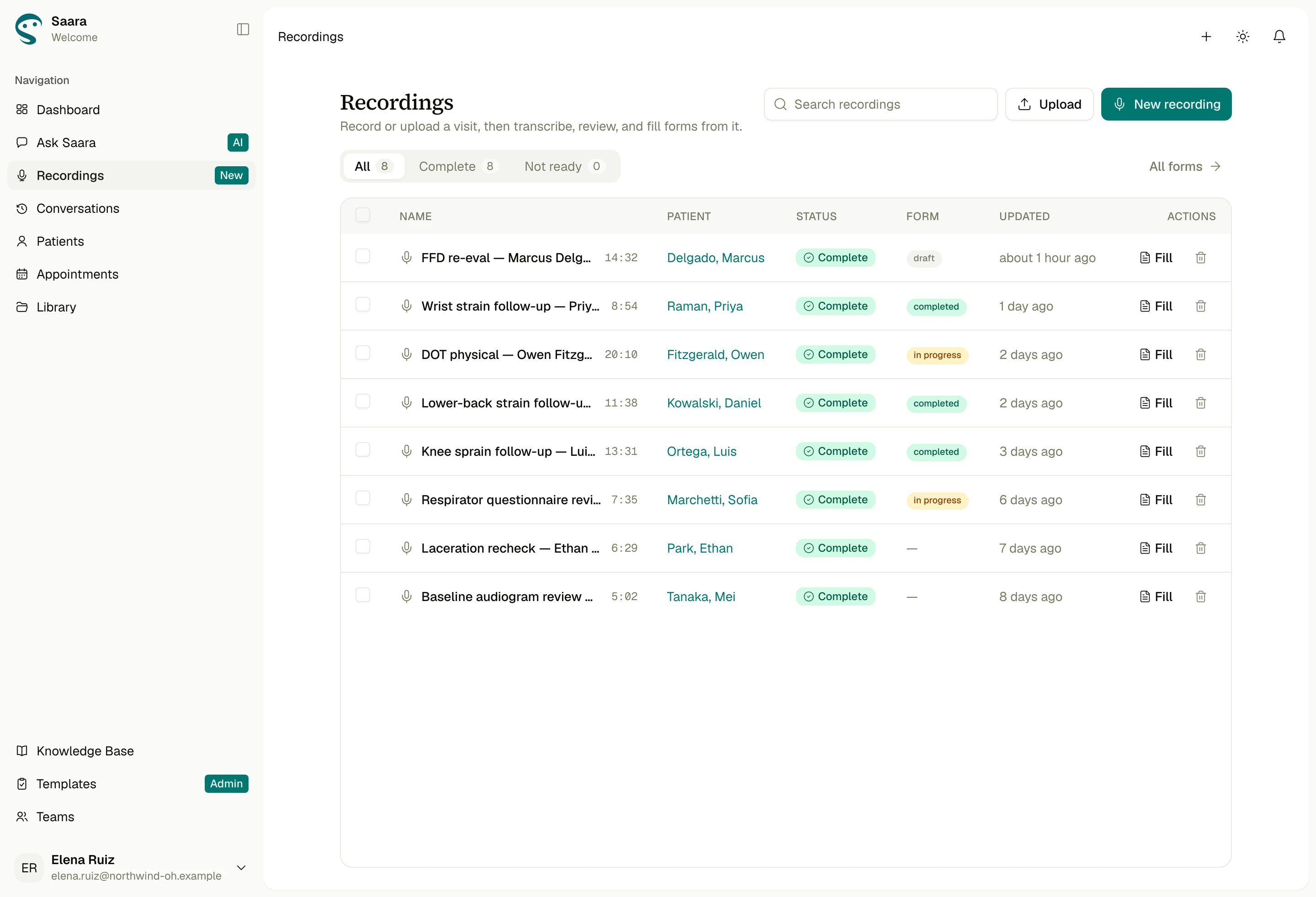
  • Recordings: every visit with its patient, the status of its transcript and its form
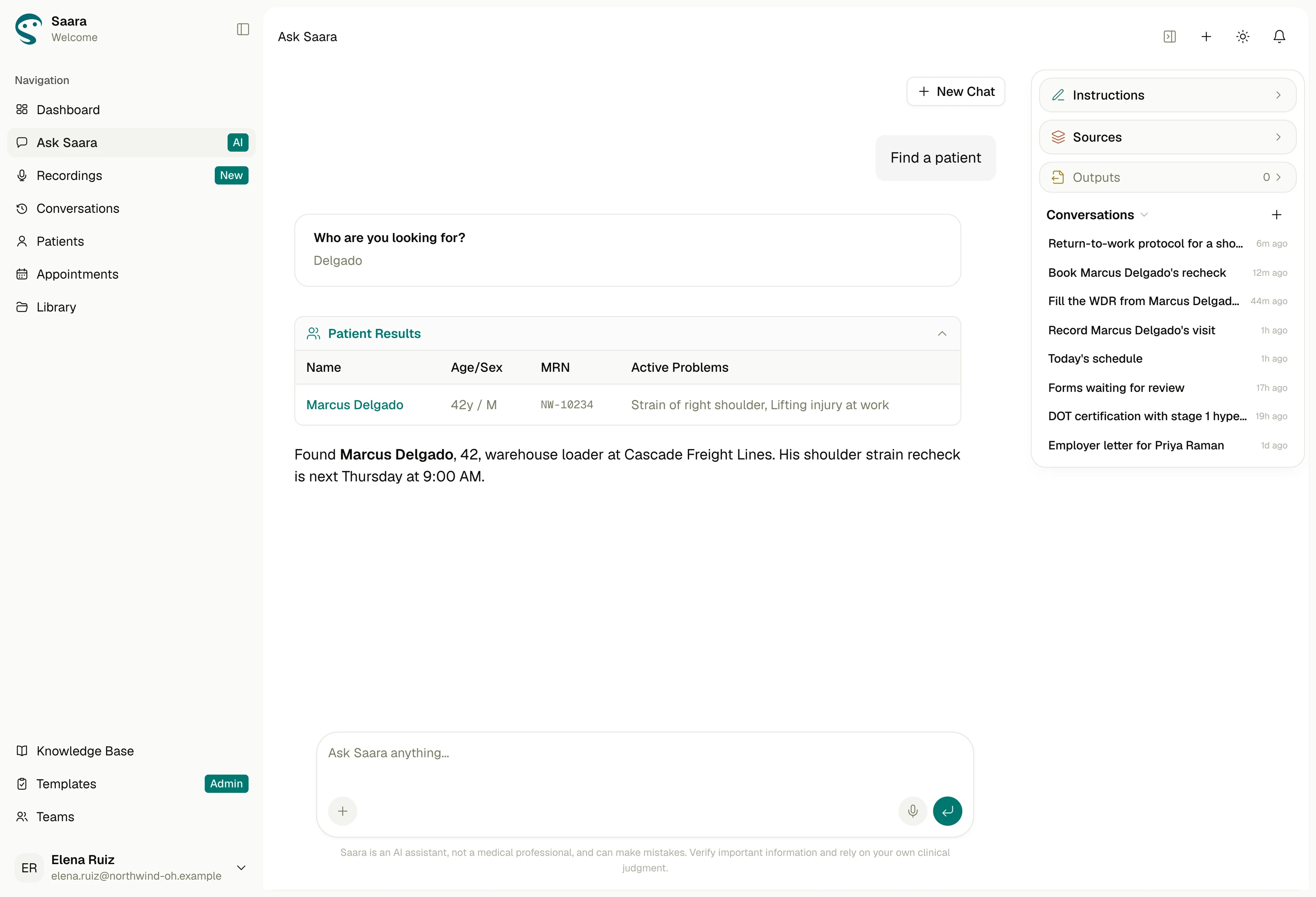
  • Ask Saara finding a patient: Marcus Delgado, 42, warehouse loader at Cascade Freight Lines, his recheck next Thursday
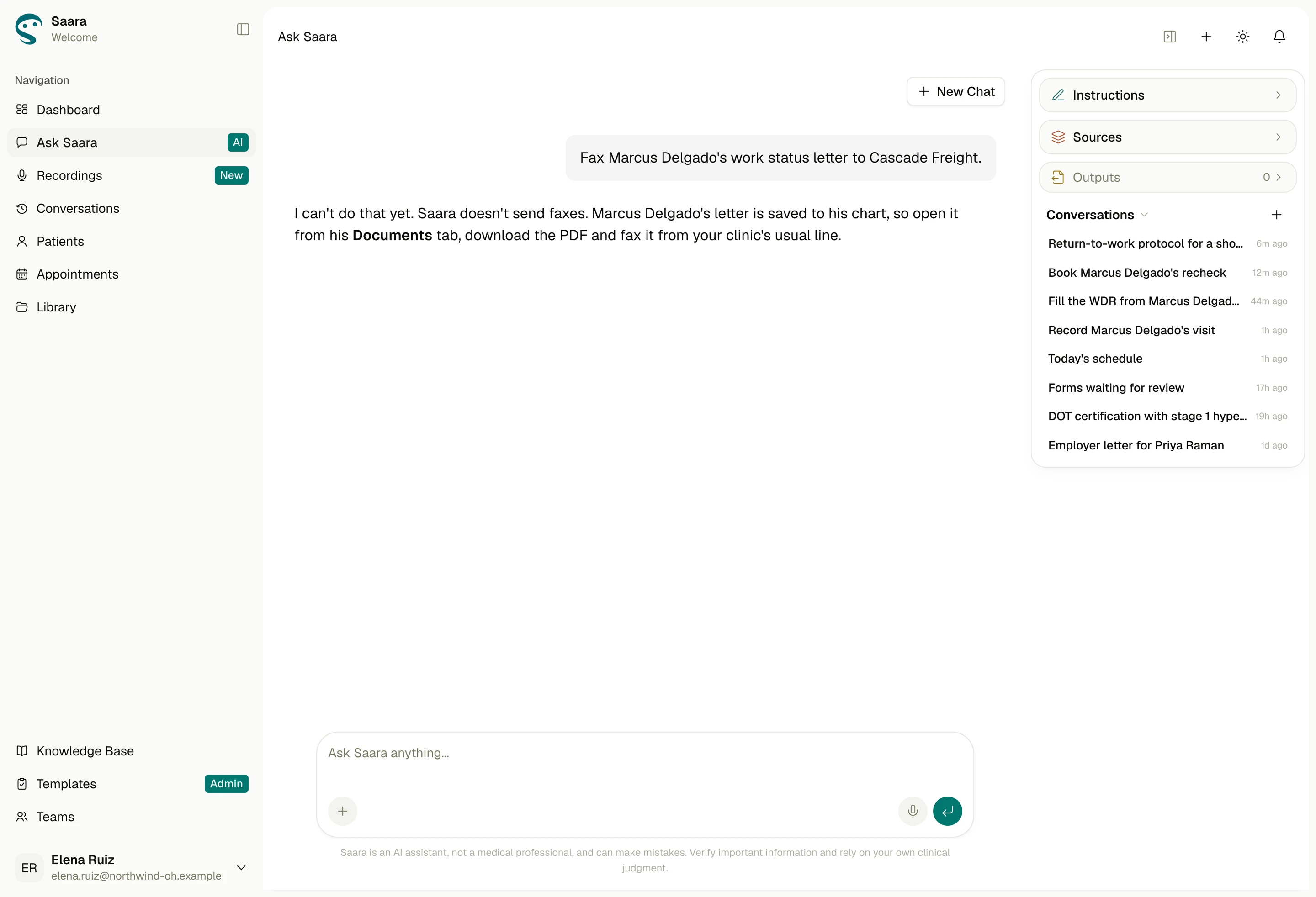
  • Ask Saara saying it can’t send faxes yet, and how to send the letter instead
Every visit with its form in one list; chat finding a patient; Saara saying what it can’t do yet.

What the data shows

Chat became the front door: in the last 90 days, people started nearly three Ask Saara conversations for every form. And Saara did the work, not just the talking: none of 638 tool calls returned an error.

Every number here comes straight from the product database and our sign-in provider.

  • 80people signed up, 68 of them outside our team
  • 257Ask Saara conversations in the last 90 days
  • 54/54form fills finished hands-free, about 31 seconds each
  • 1,985messages exchanged with Saara since the first alpha
  • 80%of customer chats put a tool to work
  • 94%of messages typed in people’s own words, not preset prompts
Ask Saara conversations, last 90 days (running total)257 conversations, nearly three for every form
Ask Saara conversations, last 90 days (running total)0150300Jul 13Aug 3Aug 24Sep 14Oct 5Oct 12257
View data
Periodconversations
Jul 1330
Jul 2057
Jul 2793
Aug 3134
Aug 10160
Aug 17177
Aug 24200
Aug 31225
Sep 7236
Sep 14241
Sep 21243
Sep 28252
Oct 5255
Oct 12257

Let users fall in love with one thing that works properly.

What I learned

One loop worth coming back for.

Our partner’s own users came back to the record, fill and sign loop in 7 of 11 weeks. Next: make a recording impossible to lose, bring trial users back for a second week, and measure time saved per exam.

Chat is the front door, not the factory floor.

Teams used Ask Saara to look things up and the forms page for form work. So chat should hand off to structured screens, not replace them.

Once trust is lost, it doesn’t come back.

In testing, trust broke fastest when the AI said it did something it hadn’t. So Saara says “I can’t do that yet” instead of guessing, and names the source of every value.