Skip to content
Work01 / 09

Eve

Designing the AI operating system for plaintiff law

I was the founding product designer of Eve, an AI casework platform that grew to more than 1,000 plaintiff law firms and a $1B valuation.

Role
Founding Product DesignerResearch & PrototypingFront-end Engineering
Skills
Product DesignResearch & AnalyticsAI PrototypingDesign Systems
Eve Legal: case work redefined

Overview

Overview

I joined Butler Labs in August 2022, when the whole company was four or five people. When ChatGPT came out, we pivoted to legal AI, and I renamed the company Eve.

At a company offsite I pitched a friendlier name that put a face to the company. AI products are helpers, so who is the best helper? EVE from WALL-E, who does everything to help WALL-E when he can’t do it all himself.

Aug 2022Butler Labs
Nov 2022ChatGPT
RenamedEve
2022–2024Solo designer
The foundationEasy Eve
300 people$1B

Final designs

Opportunity

Eve could already do a lot, but getting value out of it took work. Our users ran from people new to software to power users, and too much of Eve expected them to know where things lived and what would happen next.

The opportunity, which we called Easy Eve, was to fix the core foundation and make every part of Eve easier to use, so more of our users would use it more.

Click a frame to zoom to it, drag to move, Ctrl or ⌘ + scroll to zoom; arrow keys pan, + and − zoom, 0 fits.

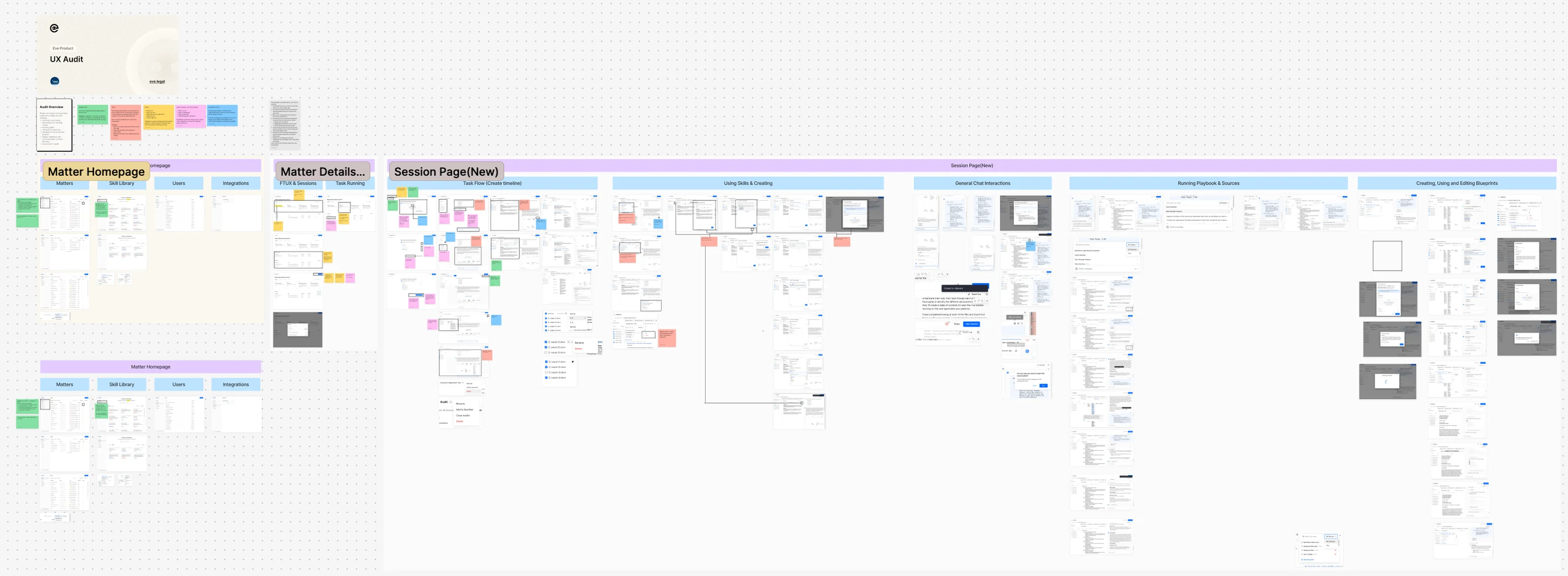
To find where to start, I audited Eve end to end, twice.

The UX audit judged every page and journey through five lenses: navigation, tasks, matters, status and feedback, and visual consistency.

Problem

People didn’t know what to do first on a matter, couldn’t tell when long work finished or failed, and met the same thing built three different ways.

Each gap shows where usage was leaking, the evidence behind it, and the feature it maps to.

  1. Chat’s full capability isn’t clear

    People didn’t know what to do first on a matter, and drafts came back as chat text, not documents.

    UX audit · PRD
  2. Skills and agents are confusing

    Saved work was split across Instructions, Playbooks and Blueprints, each made a different way, and blueprints were hard to find.

    UX audit
  3. Personalization is lacking

    Home looked the same for every role. People wanted their leads, intake and activity up front.

    21 customer calls
  4. Search isn’t robust

    It needed exact spelling and name formatting, so people fell back to scrolling the matter list.

    11 customer calls
  5. Home isn’t being used

    After the homepage launched, most people still went straight to the Matters page instead of acting on Home.

    Usage data
  6. Communication is lacking

    Notifications and activity were unclear: was it for me or the firm, and could I click it?

    27 + 26 customer calls
  7. Navigation isn’t consistent

    Similar things looked and worked differently from page to page, and the sidebar didn’t scale.

    UX audit

Solution

Each gap maps to one of seven features. Email ingestion comes first. The six after it are the Easy Eve work. Pick a feature to see what shipped and how we got there, then its prototype and research.

01 / 07

Email ingestion & Activity

Vendors were closing their APIs, so I made email Eve's own way in: each matter gets an address, files land in folders you can see, and Activity logs it all.

  1. Email flow

The problem

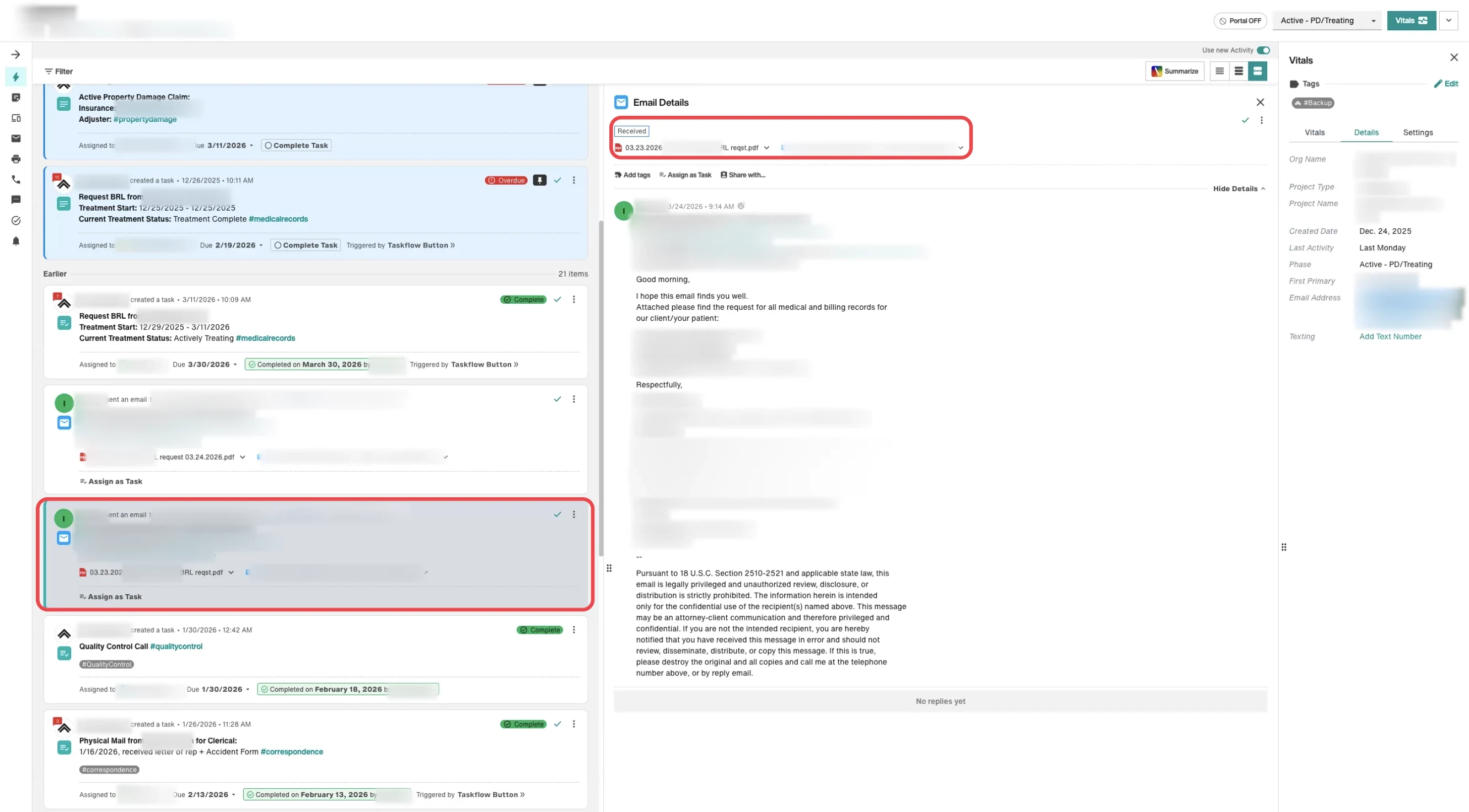
Case documents reached Eve through syncs from legacy case management tools. Then those vendors, seeing Eve as competition, began limiting API access, so staff would have to download every attachment, find its case and upload it to the right folder, every day. Research also found no task system, an incomplete activity log, and notes and files kept apart.

A customer's case tool
A customer's case management tool: one case's tasks and emails, with an email opened.

What shipped

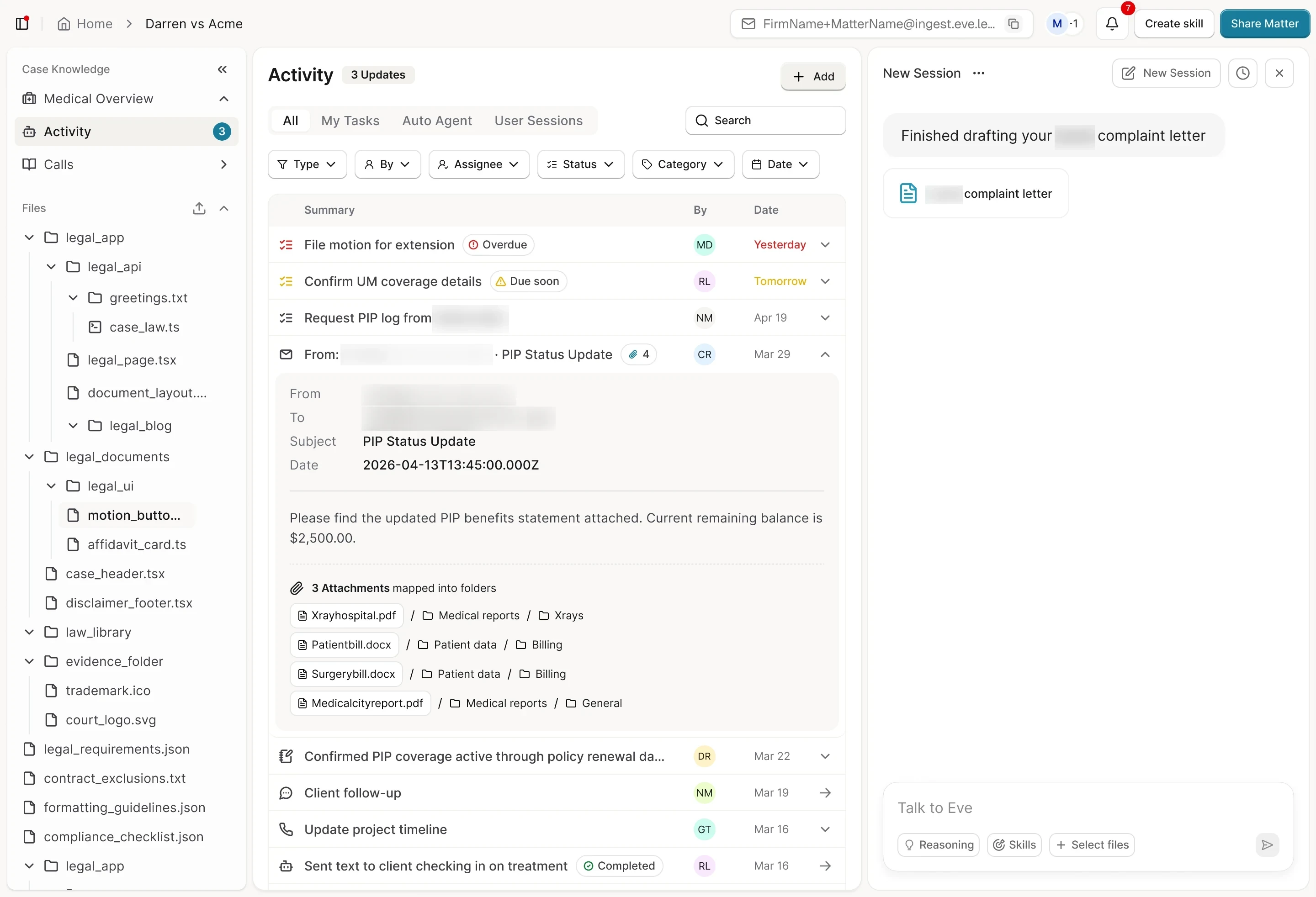
Forward an email to the matter's address from any email client, and Eve files each attachment into the matter's folders and adds a row to Activity.

Decision
One address per matter instead of one firm inbox, where every email relied on Eve identifying the matter.
Trade-off
For alpha, cut admin self-serve setup and its accuracy test; customer success sets up folders instead.
Final design
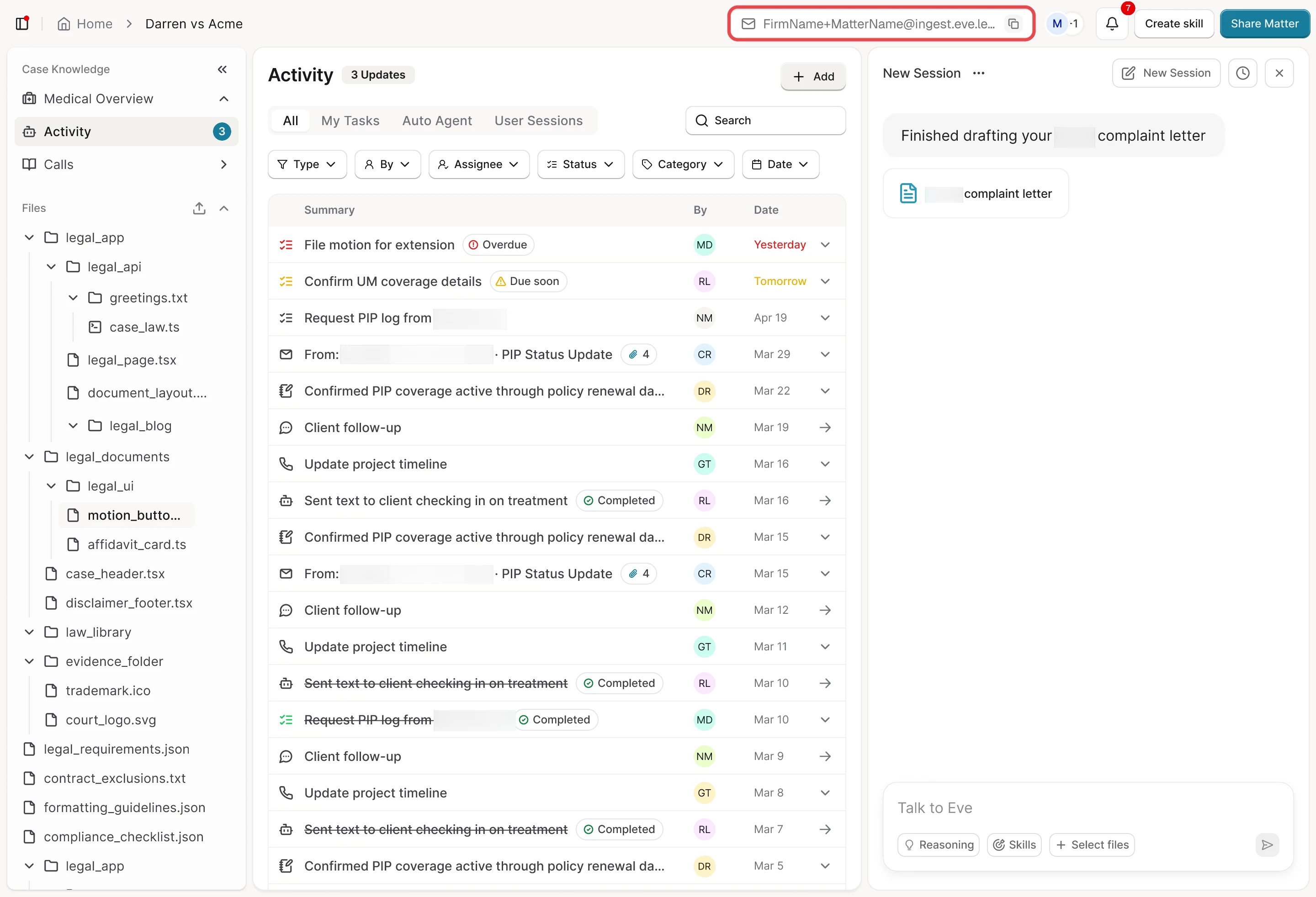
The address with a copy button in each matter header, every file's folder path shown. Threads not shipped.
  1. 01A forwarded email lands as one row in Activity

  2. 02Who owns a follow-up, opened in place

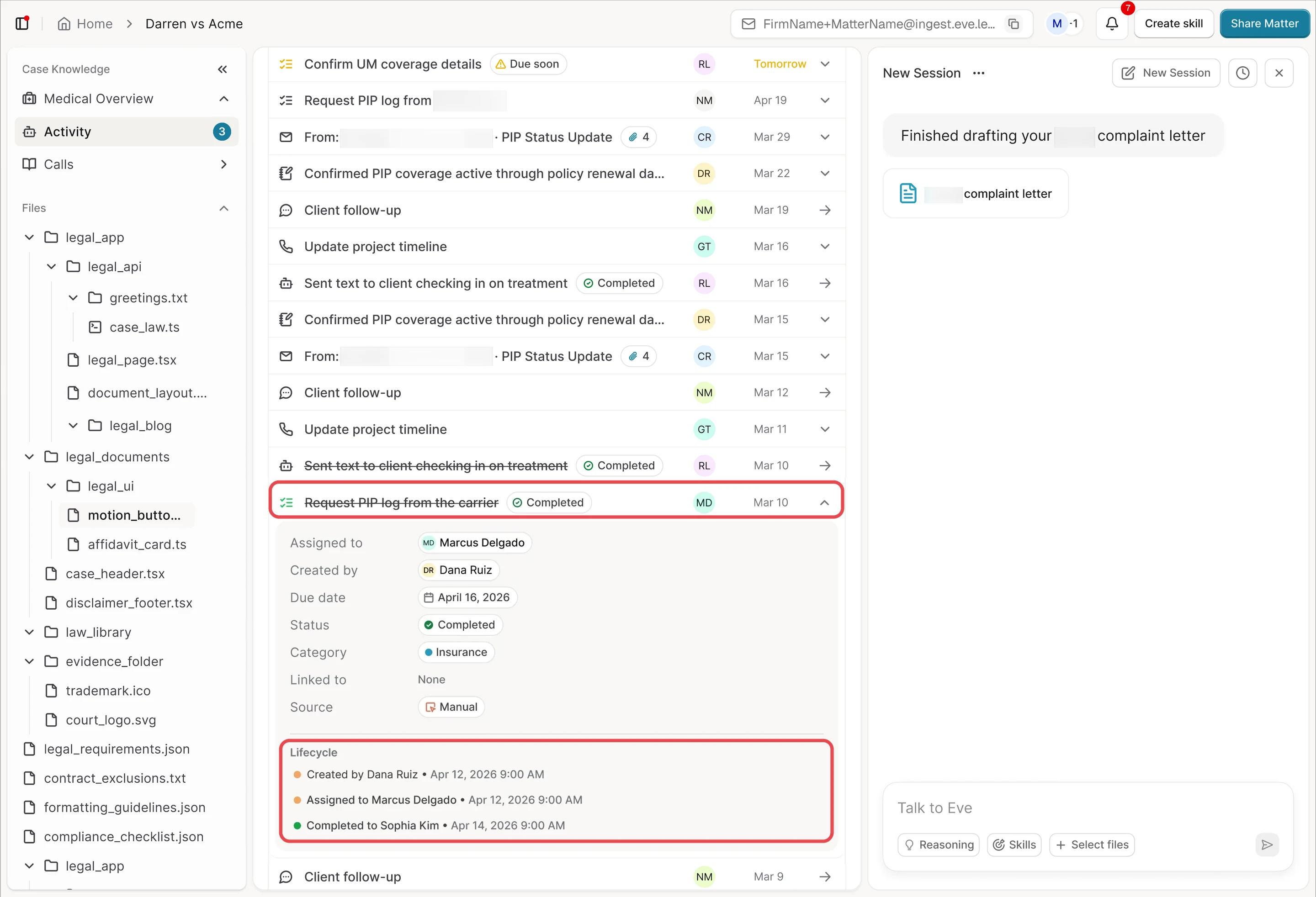
  3. 03Marked complete, a task is struck through

  4. 04Inside a matter, the same log narrows

Component anatomy

Each piece numbered beside the component.

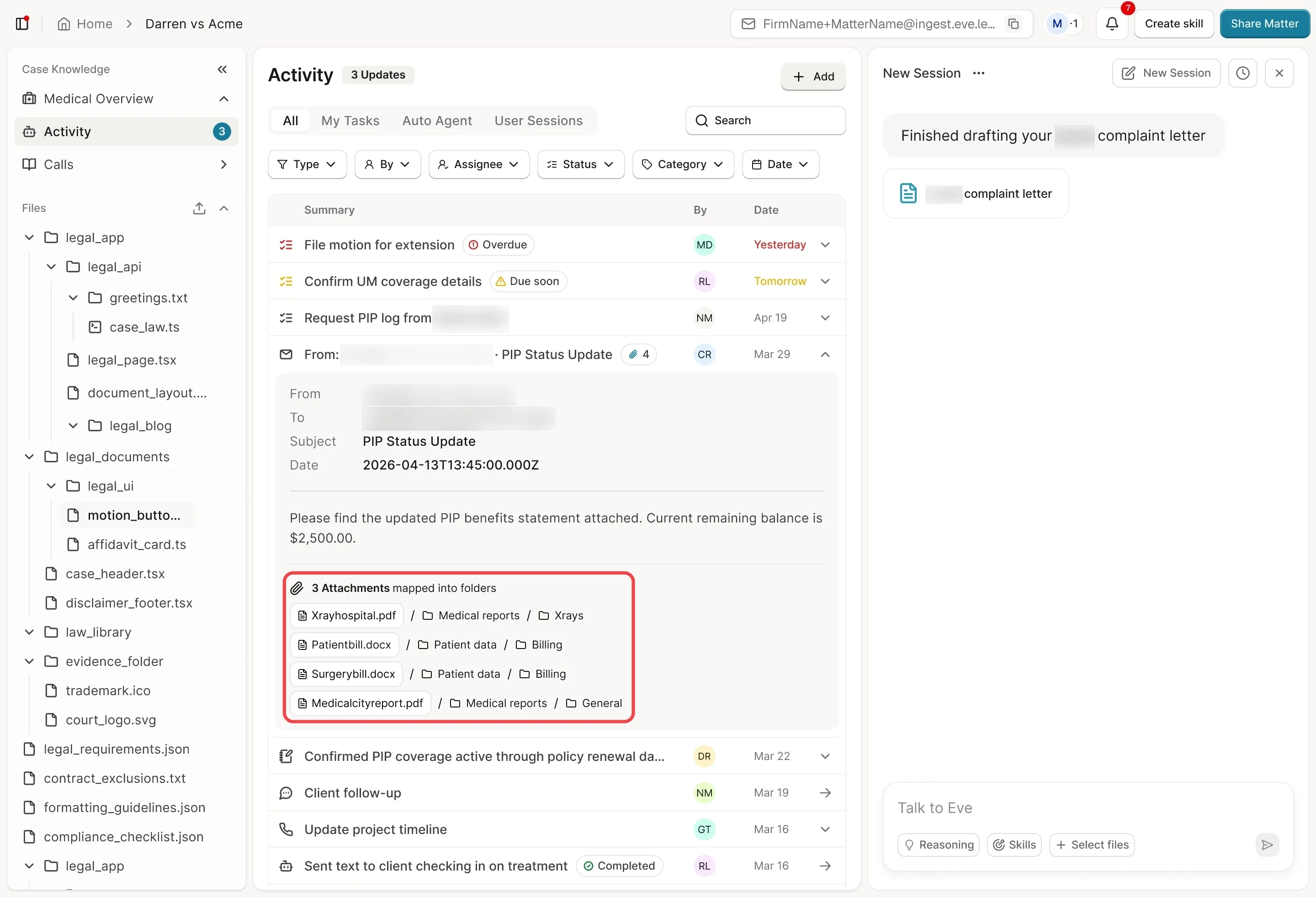
A forwarded email, opened in Activity
Shipped
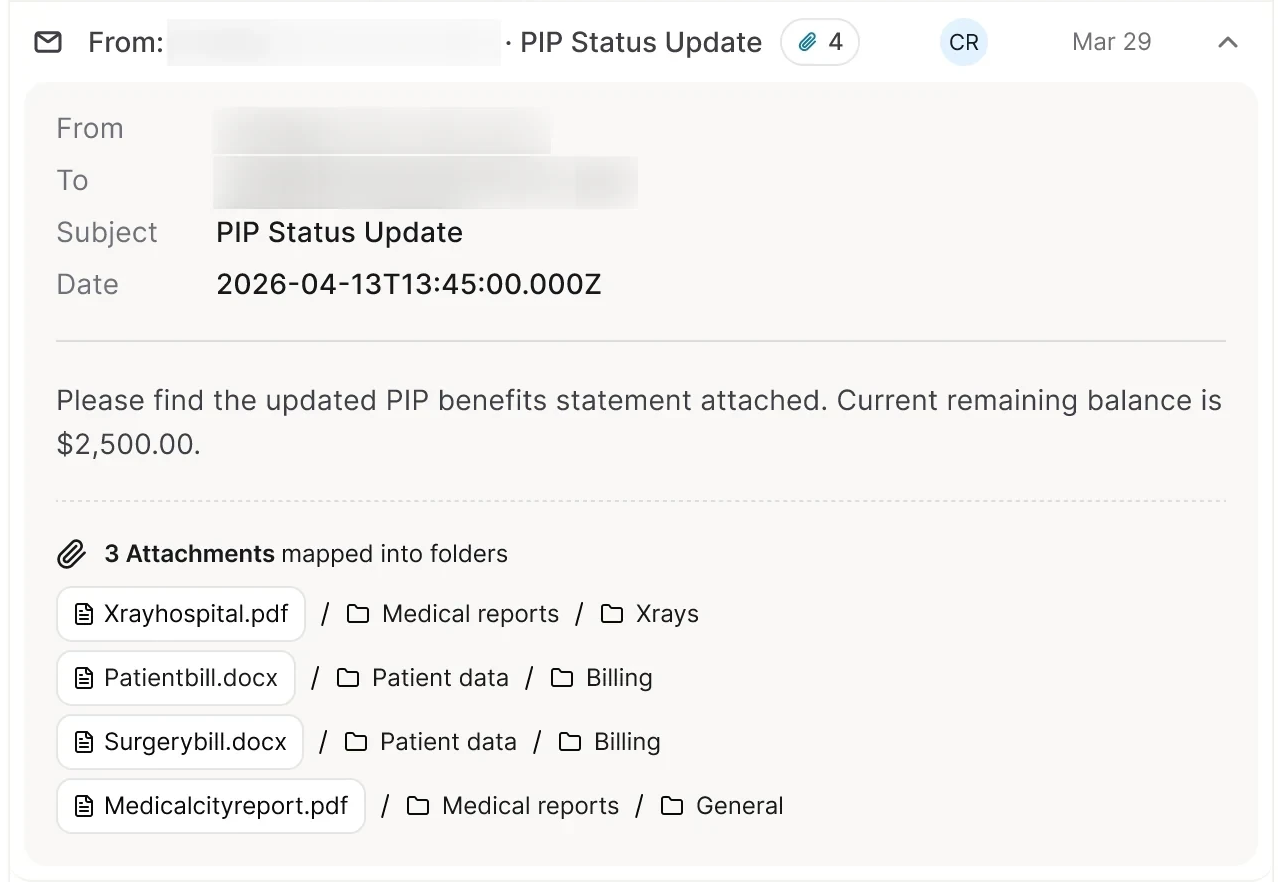
A forwarded email, opened in Activity: 1 Email row, 2 Sender, 3 Subject, 4 Attachment count, 5 Open in place, 6 Message details, 7 Message, 8 Attachments, 9 File, 10 Folder path
  1. Email rowA forwarded email becomes one row in the matter’s Activity
  2. SenderWho sent it, first in the row (addresses blurred)
  3. SubjectThe email’s subject, after the sender
  4. Attachment countHow many files came with it
  5. Open in placeThe row opens in place to the whole email
  6. Message detailsFrom, To, Subject and Date, then the values (addresses blurred)
  7. MessageOpened, the row shows the message itself
  8. AttachmentsAttachments mapped into folders, one line per file
  9. FileEach attachment as its own file chip
  10. Folder pathThe folder path it was filed into, like Medical reports / Xrays

Where it’s used

  1. A forwarded insurer email in a matter’s Activity, each file showing its folder.
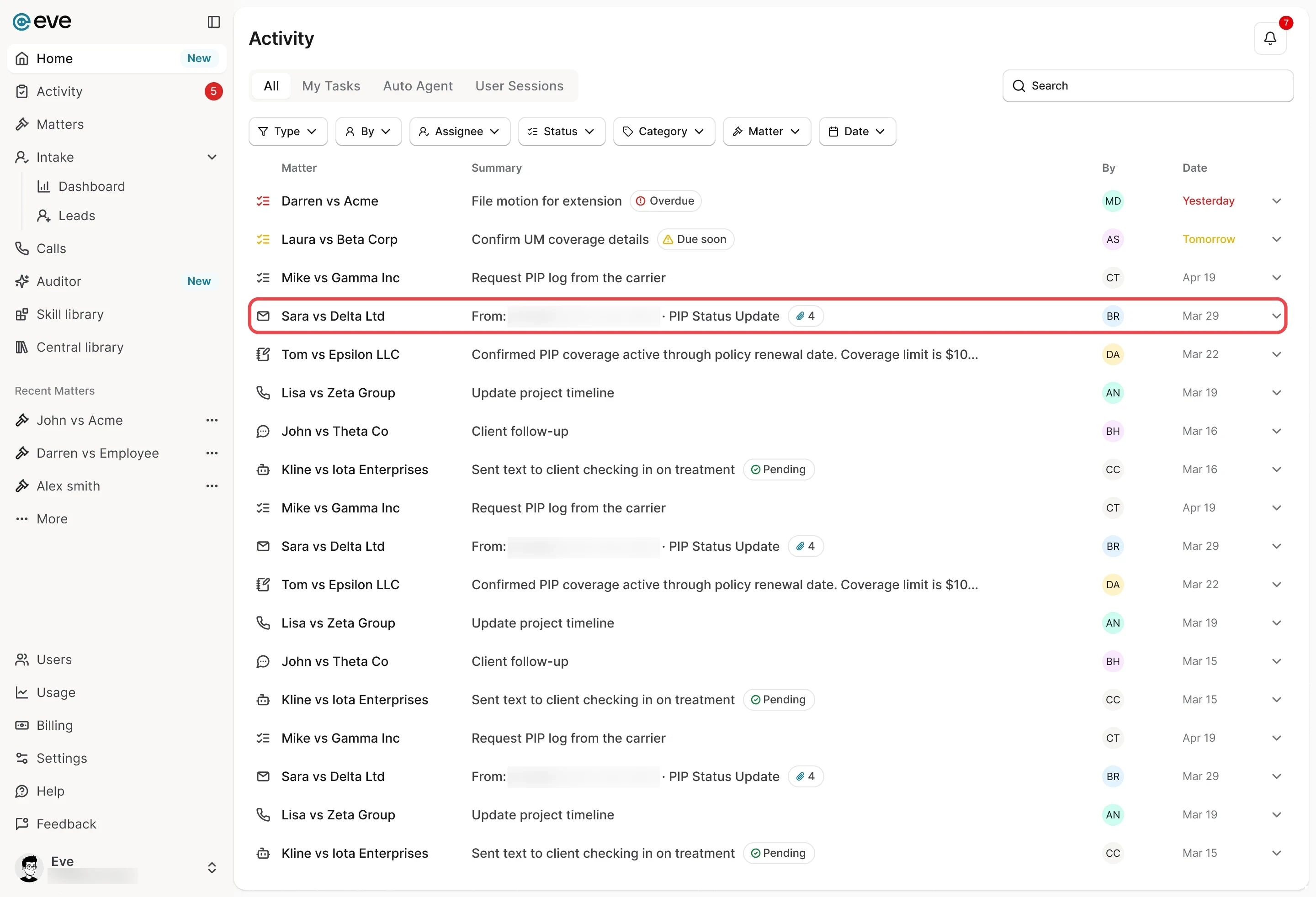
  2. Firm-wide, each email row leads with its matter, like Sara vs Delta Ltd

The matter’s address, in its header
Shipped
The matter’s address, in its header: 1 Matter address, 2 Copy, 3 Bell, 4 Create skill
  1. Matter addressEvery matter’s own address: firm name + matter name @ingest.eve.legal
  2. CopyCopy the address, then forward from any email client
  3. BellThe bell and its unread count: one place for every running task
  4. Create skillCreate skill opens a three-step drawer that makes a skill

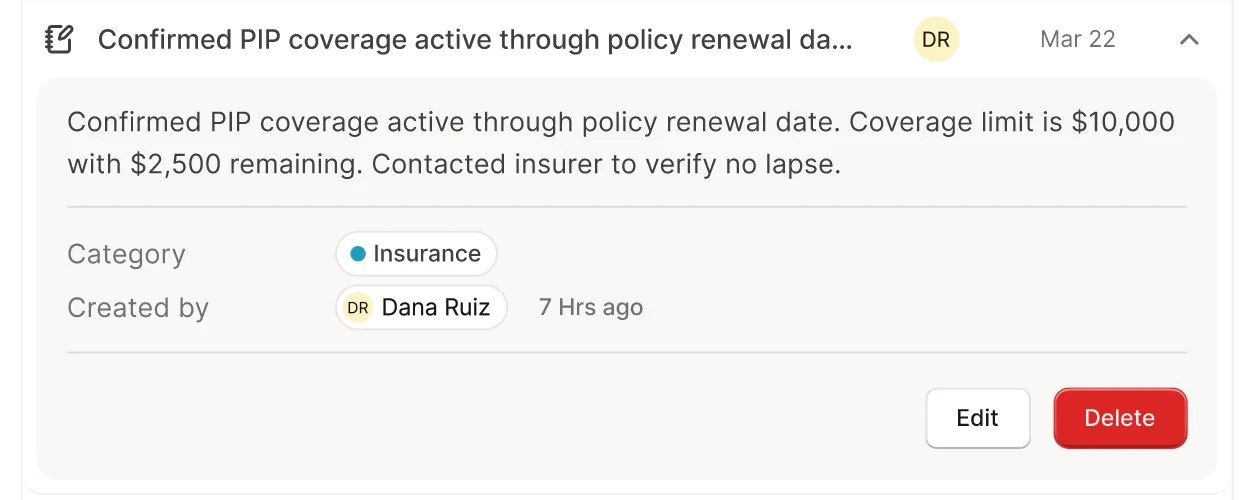
A note, opened in place
Shipped
A note, opened in place: 1 Note, 2 Open in place, 3 Note text, 4 Category, 5 Author, 6 Edit and Delete
  1. NoteA case note sits in the same log
  2. Open in placeIt opens in place, like an email or a task
  3. Note textOpened, the note itself
  4. CategoryIts category, like Insurance
  5. AuthorIts author, under Created by
  6. Edit and DeleteEdit, or a red Delete

Where it’s used

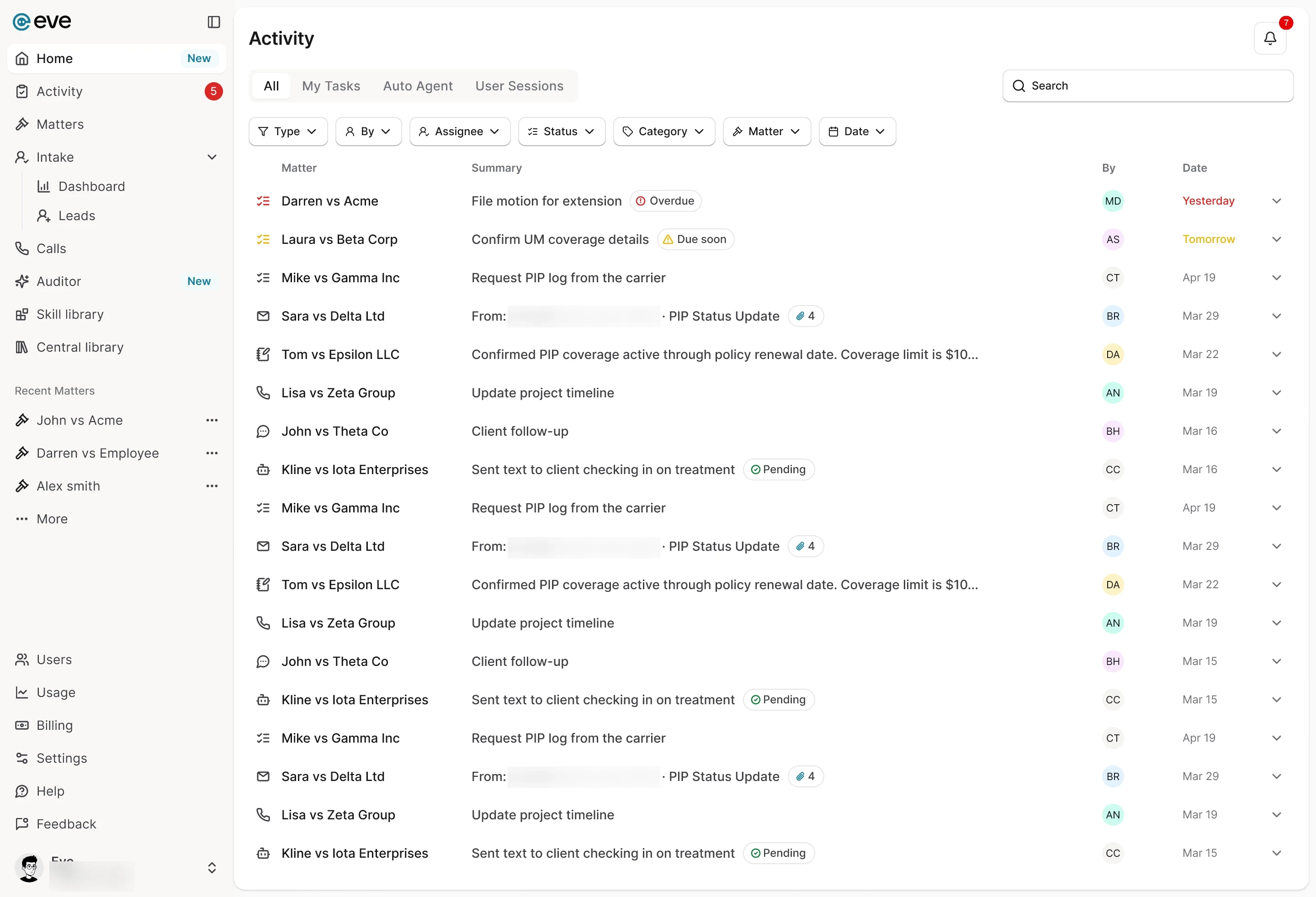
  1. Firm-wide Activity: tasks, emails, notes, calls and agent runs, with a Matter column

How we got there

Earlier rounds, oldest first, then what shipped and any later pass. Open any screen full size, or step through the flow.

Flow 1 of 6

Every matter gets its own address

Firms already live in email, and no third party can shut it off.

Where should the email forwarding address live, and how much should Eve decide alone?

  1. The first idea was one firm-wide address, like acmefirm@ingest.eve.legal, with Eve working out each email's matter. Every email then relied on Eve identifying the matter.
  2. Another version listed email ingestion as a connected service on a matter's Integrations tab, beside Gmail, Outlook and Dropbox. The forwarding address came first: nothing to install, and no third party can shut it off.
  3. In Auto-file mode, Eve filed every email it could identify and surfaced only the ones it couldn’t, flagged Needs attention with a Low confidence chip.
  4. Manual Approval held every forwarded email on Home for approval, with a High or Low confidence chip. We landed in between: Eve files what it's sure of and asks only when unsure.
  5. The version that stuck gave every matter its own address, FirmName+MatterName@ingest.eve.legal. Eve knows the matter the moment an email arrives, instead of guessing.
  6. I tried two homes for the address: a card atop the matter's Activity feed, or a pill with a copy button in the matter header. The header won.
  7. Shipped
    The matter header, with its address and a copy button beside sharing and the bell
    Every matter got its own address, firm name + matter name @ingest.eve.legal. Forward from any email client, with no plugin to break, and Eve already knows the matter. We landed between Auto-file and Manual Approval: Eve files what it's sure of and asks only when unsure.

What changedEvery matter got its own address, with a copy button in its header; Eve files what it's sure of and asks only when unsure.

Flow 2 of 6

Folders Eve files into

Every firm organizes files differently. These are steps of my admin setup prototype.

How much folder setup can an admin take on, and how do they trust Eve's filing before it goes live?

  1. Step 2 of admin setup offered Eve's default personal injury folders, each with a description telling Eve what belongs there, plus subfolders like ER Records. Admins could add, rename or remove them.
  2. Group by provider let Eve read the provider's name from each document and make a subfolder per provider, like City Hospital. A preview showed the structure before anything was filed.
  3. Step 3 began with a test batch: each email sent to a test address came back with Eve's matter, a confidence score and a filing plan to mark Correct or Wrong.
  4. Step 3 asked the admin to forward 5+ real emails to a test address and mark each filing plan Correct or Wrong. Here a run at 60% accuracy can't go live until fixed and re-run.
  5. Correcting a filing during the test opened Help Eve learn: pick what went wrong, add your own instructions, then remap. The final keeps the idea: when Eve is unsure, it learns from the attorney's pick.
  6. Setup ended by asking who sees email filing: just the admin for now, with rollout later from Settings, or every user's Home feed. It was cut with the rest of admin setup.

Where it standsThe admin setup moved to a follow-up release; customer success sets up each firm's folders with them.

Flow 3 of 6

Each attachment shows its folder

When a paralegal forwards medical records to a matter, how does Eve file each attachment and show exactly where it went?

  1. This version opened the email inline, then a Folder mapping table paired each attachment with a folder. The final keeps that pairing, written as one folder path per file.
  2. A colored banner said how each email arrived: forwarded directly, a forwarded thread, Eve CC'd on a reply, or files sent alone. The final drops it and writes each file's route as one folder path.
  3. In the audit trail, Edit turned an attachment's folder and subfolder into two dropdowns, and a Re-map matter button sat on the email. The final keeps one folder path per file, still correctable inline.
  4. When Eve couldn't identify the matter, it listed likely matters, each with a confidence and a reason. The final keeps this fallback: Eve suggests instead of guessing, and learns from the pick.
  5. Shipped
    The opened email lists each attachment's folder path, like Xrayhospital.pdf / Medical reports / Xrays
    A forwarded email becomes one row in the matter's Activity, with sender, subject and attachment count. Opened, it shows every file's folder path, so nothing is a black box.
  6. Firm-wide, each email row leads with its matter, like Sara vs Delta Ltd

What changedThe final writes each file's route as one folder path, still correctable inline, and keeps the suggested-matters fallback.

Flow 4 of 6

One log for each matter and the firm

On calls, people couldn't tell if activity was for them or the firm.

How could one log hold everything that happens on a case?

  1. The bell inside a matter became Matter Activity, listing that matter's runs by day. It still only knew Eve's own work, not a team's tasks, emails and calls.
  2. Next, Activity became its own page in the matter. The first feed used a card per item, like intake files or approval requests, each with attachment count and status.
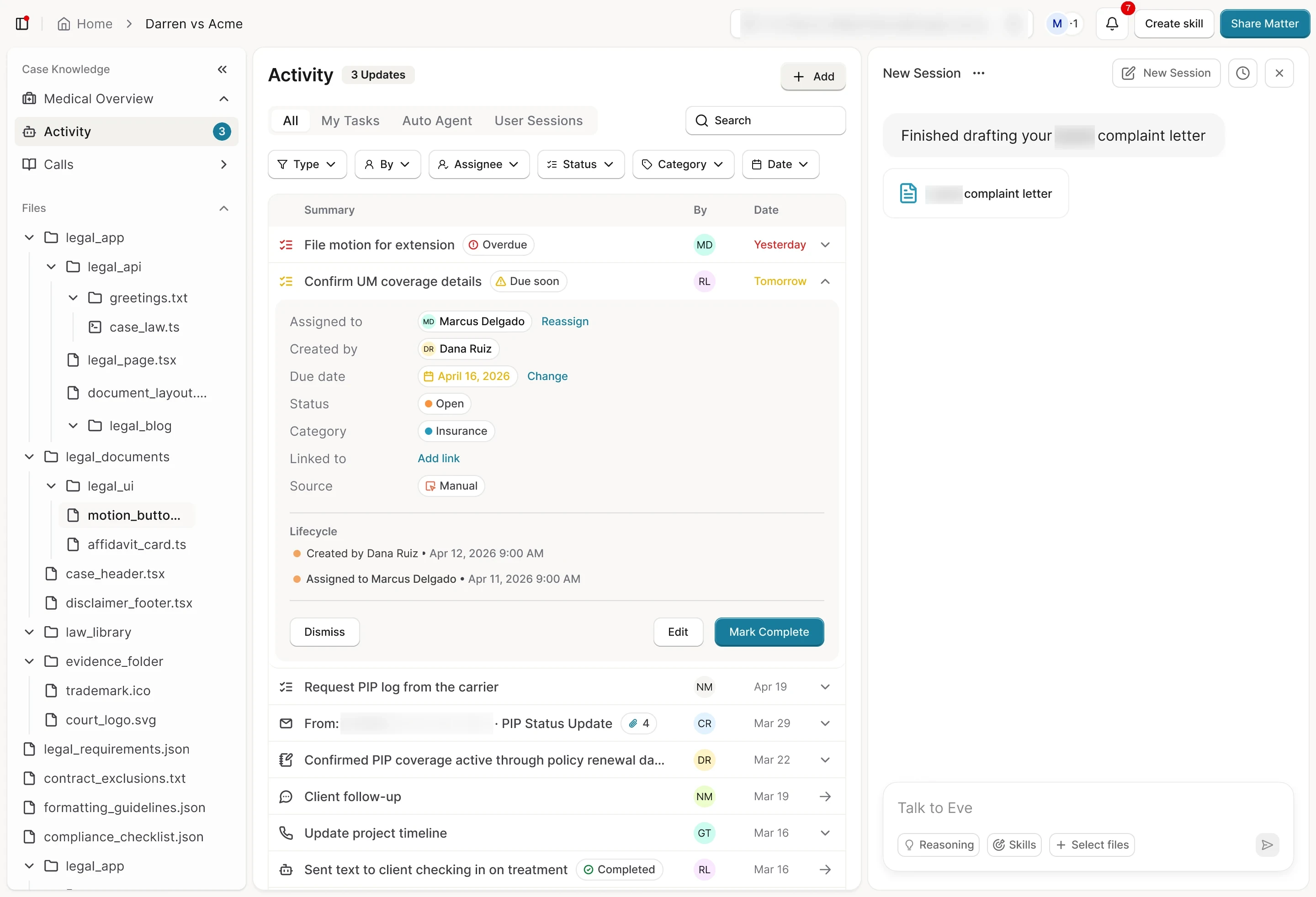
  3. I stacked header options to compare tabs, filters and where Add, Search and Export sit. The final swapped Automated and Manual tabs for All, My Tasks, Auto Agent and User Sessions.
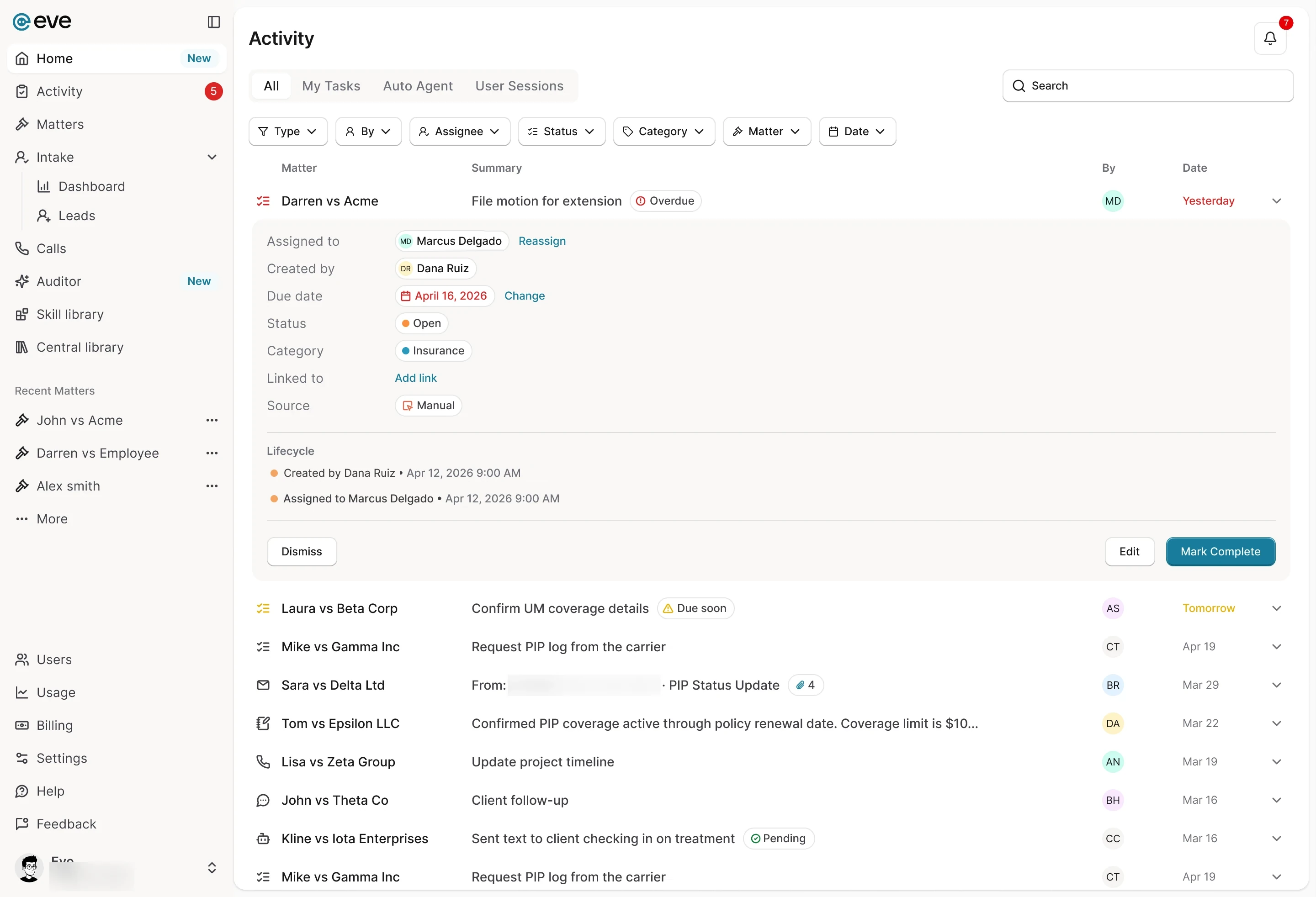
  4. A working prototype I built made firm-wide Activity an audit trail, with type chips and filed emails beside Eve's runs. The final keeps one list, adding a Matter column and tabs separating mine from Eve's.
  5. Shipped
    Firm-wide Activity: tasks, emails, notes, calls and agent runs, with a Matter column
    All, My Tasks, Auto Agent and User Sessions separate what's mine from what Eve ran, and filters cover type, person, assignee, status, category, matter and date.

What changedActivity became a page in every matter and one for the whole firm, built from the same rows.

The parts

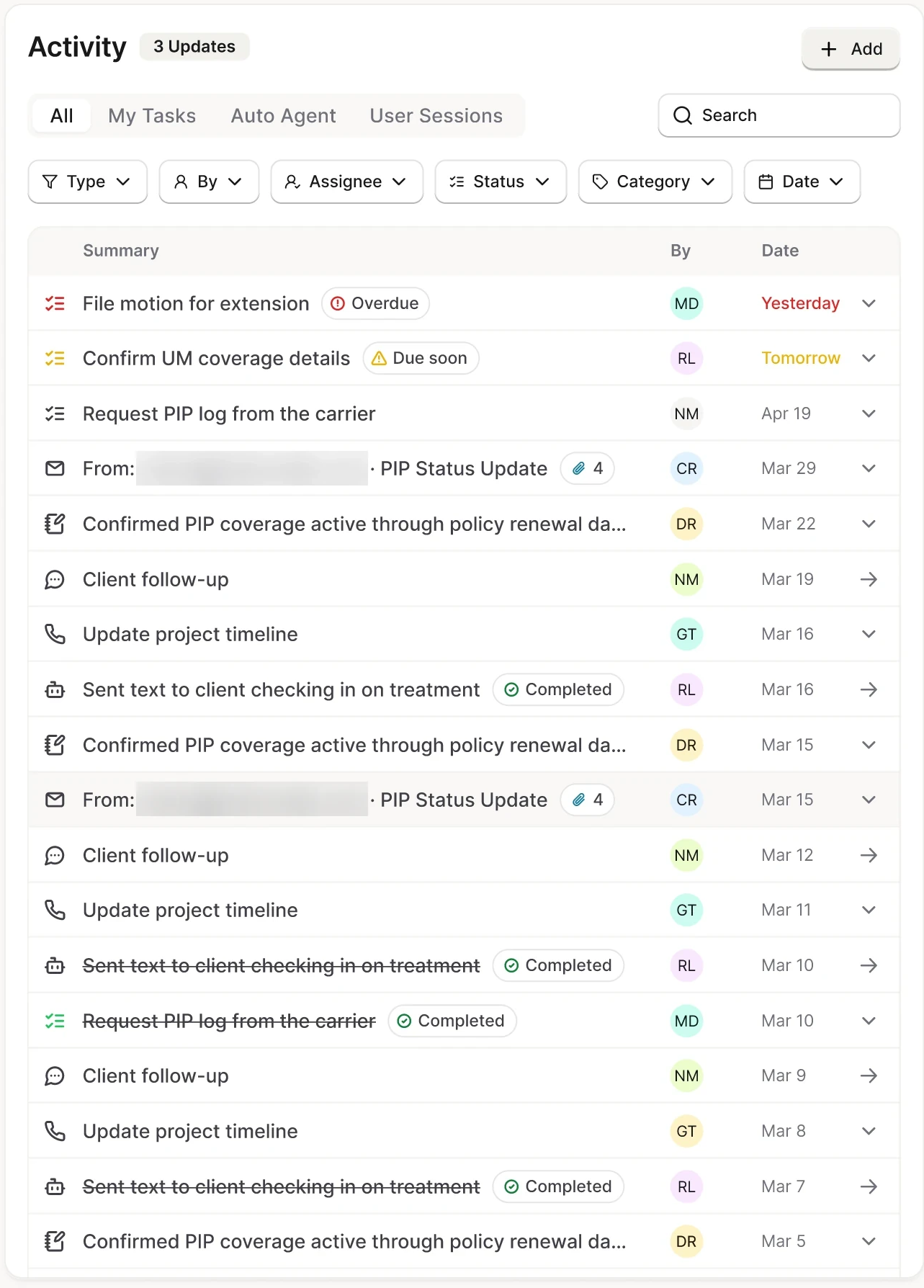
A matter’s Activity log
Shipped
A matter’s Activity log: 1 Activity, 2 Add, 3 Tabs, 4 Search, 5 Filters, 6 Row type, 7 Due badge, 8 Date, 9 Completed
  1. ActivityThe log’s heading, with a count of updates
  2. AddAdd, at the top right of the log
  3. TabsAll, My Tasks, Auto Agent and User Sessions separate what’s mine from what Eve ran
  4. SearchSearch, across from the tabs
  5. FiltersFilters for type, person, assignee, status, category and date
  6. Row typeAn icon for each kind of row, like a task, an email or a call
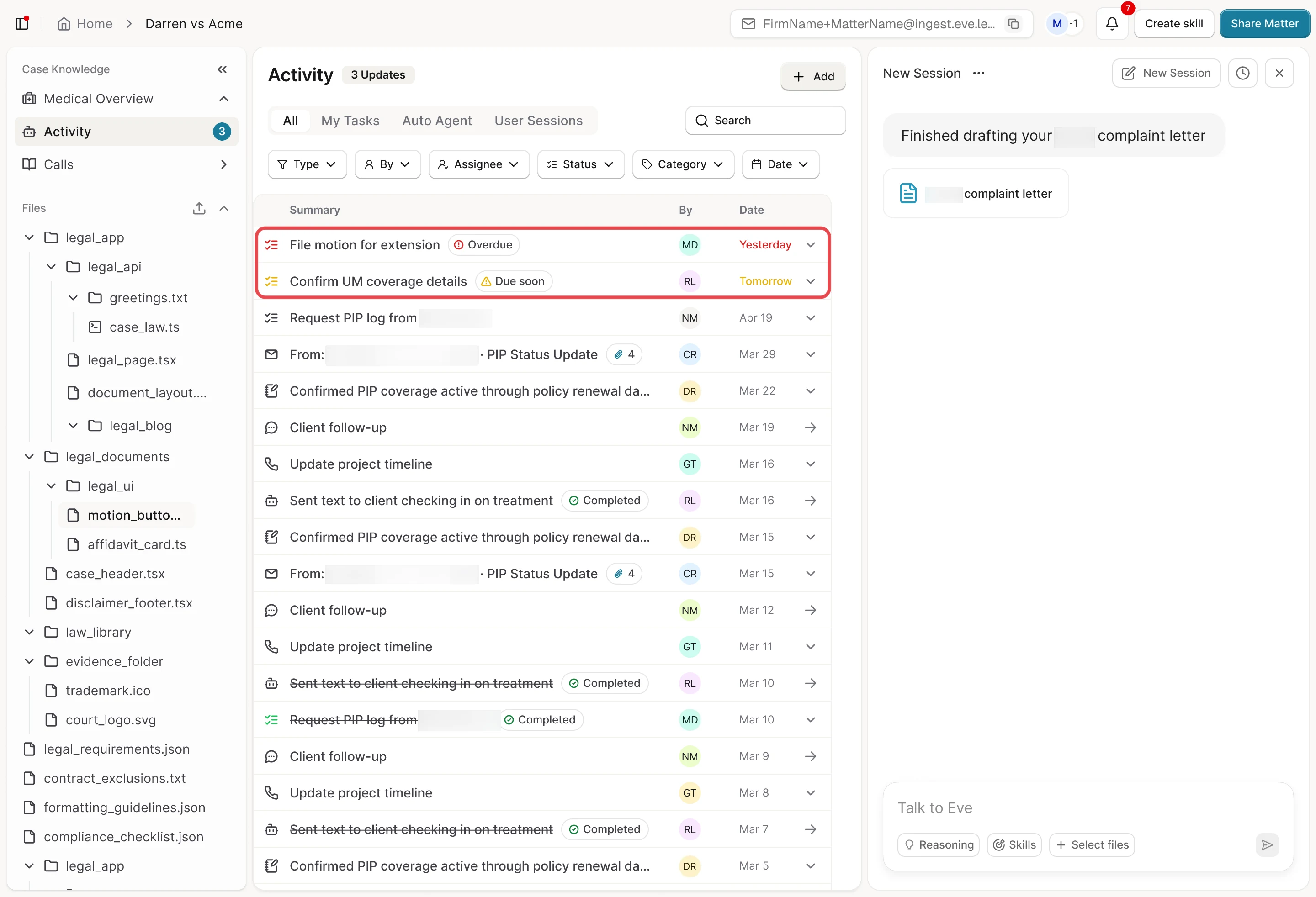
  7. Due badgeOverdue or Due soon, beside the task
  8. DateThe date turns red when overdue and amber when due soon
  9. CompletedMarked complete, a task is struck through

Where it’s used

  1. Inside a matter, the same log narrows to one case’s tasks and emails
  2. Firm-wide, each email row leads with its matter, like Sara vs Delta Ltd

Flow 5 of 6

Tasks with an owner

Follow-ups lived in other tools.

What does a task in a matter need so everyone knows its owner, due date and history?

  1. My first pass dropped tasks into the feed as cards with Assigned, Incomplete and Completed pills, a due-date chip and Automated or Manual tags.
  2. The next version flattened cards into rows with Incomplete, Due today and category pills. The final puts the due date in the date column and moves category into the opened task.
  3. Shipped
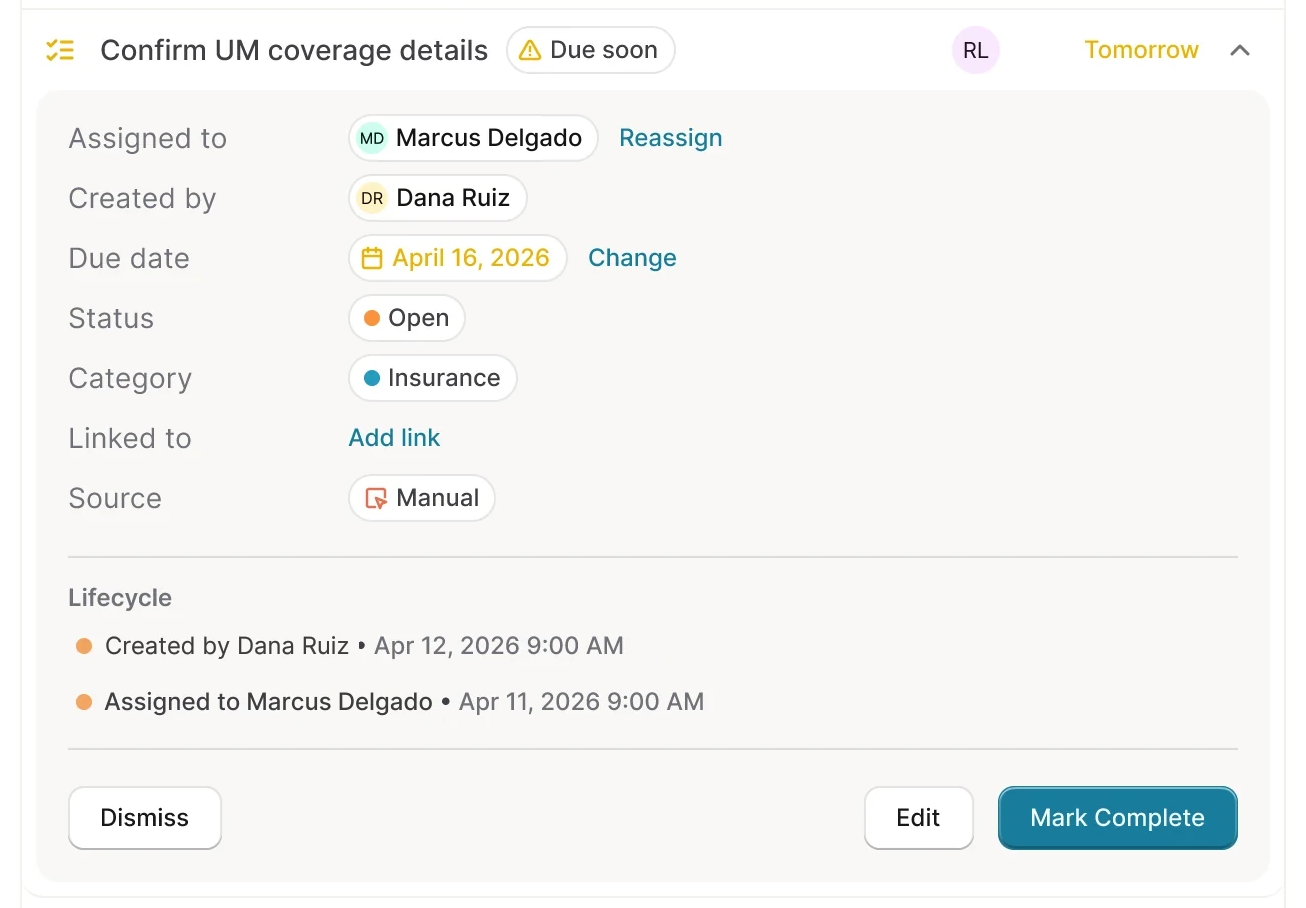
    A task due tomorrow, opened in place with its details, lifecycle and actions
    The date turns red when overdue and amber when due soon. Opened in place, a task shows its owner, due date and lifecycle, with actions like Reassign and Mark Complete, on the matter and firm pages alike.

What changedTasks became one row type in Activity, with the due date in the date column and category inside the opened task.

The parts

A task, opened in place
Shipped
A task, opened in place: 1 Task, 2 Due soon, 3 Date, 4 Open in place, 5 Owner, 6 Due date, 7 Details, 8 Lifecycle, 9 Actions
  1. TaskTasks are one row type in Activity
  2. Due soonA Due soon badge beside the task
  3. DateDue tomorrow, so the date turns amber
  4. Open in placeThe row opens in place to the whole task
  5. OwnerWho owns it, with Reassign
  6. Due dateThe due date, with Change
  7. DetailsStatus, category, link and source, inside the opened task
  8. LifecycleIts lifecycle: who created and assigned it, and when
  9. ActionsDismiss, Edit and Mark Complete

Where it’s used

  1. Marked complete, a task is struck through and its lifecycle records who and when
  2. Firm-wide Activity with an overdue task opened in place, showing its matter, owner, due date and lifecycle.

Flow 6 of 6

Next: threads, not 38 entries

Each forwarded email became its own Activity row.

How should a matter hold a whole conversation, so a 38-message thread isn't 38 entries?

  1. A first pass grouped a matter's emails into threads, each with its message count, attachments and last activity. Opening one summarized messages sent and received, each attachment marked Filed. Threads were the next design problem after email filing, on a roadmap with plugins, full independence from third-party case management and validating at firm scale.

Where it standsNot shipped. Threads were the next design problem after email filing, on a roadmap with plugins.

Prototype

A forwarded email becomes one row in the matter's Activity. Open the row to see the message and every attachment's folder path. When Eve isn't confident, it suggests likely matters. The attorney picks one, and Eve learns from it.

Research

We showed the prototype to design-partner firms and listened on discovery calls. What they said shaped how Eve files email and keeps the case log.

“Email plugins often fail and break. The accuracy of what these tools extract is critical — and most of them are highly inaccurate.”
  1. Reliability must be visible

    Firms had been let down by email tools that broke or pulled the wrong details, so they needed to see what happened to each email.

    Design-partner discovery calls When a paralegal forwards medical records to a matter, how does Eve file each attachment and show exactly where it went?
  2. Automation felt risky

    Firms feared Eve would ingest everything or expose sensitive data. It takes only forwarded email and would offer automation after about 20–30 accurate filings.

    Design-partner discovery calls Where should the email forwarding address live, and how much should Eve decide alone?
  3. Small firms have no slack

    Small firms have no dedicated case managers, and firm admins had no time to set up folder and matter mapping.

    Design-partner discovery calls How much folder setup can an admin take on, and how do they trust Eve's filing before it goes live?
  4. One wrong filing costs everything

    One silent mis-file erodes more confidence than a hundred correct filings build.

    Design-partner discovery calls When a paralegal forwards medical records to a matter, how does Eve file each attachment and show exactly where it went?
  5. No way to delegate and track work

    Attorneys managing hundreds of cases had no way to hand off work and know it got done. Assignments got lost in Slack by the afternoon.

    Prototype sessions with design-partner firms What does a task in a matter need so everyone knows its owner, due date and history?
  6. The activity log told half the story

    Notes were siloed away from the timeline, and calls, tasks and Eve's own work lived in different places.

    Prototype sessions with design-partner firms How could one log hold everything that happens on a case?

Looking back

Fix the foundation, then follow the problem.

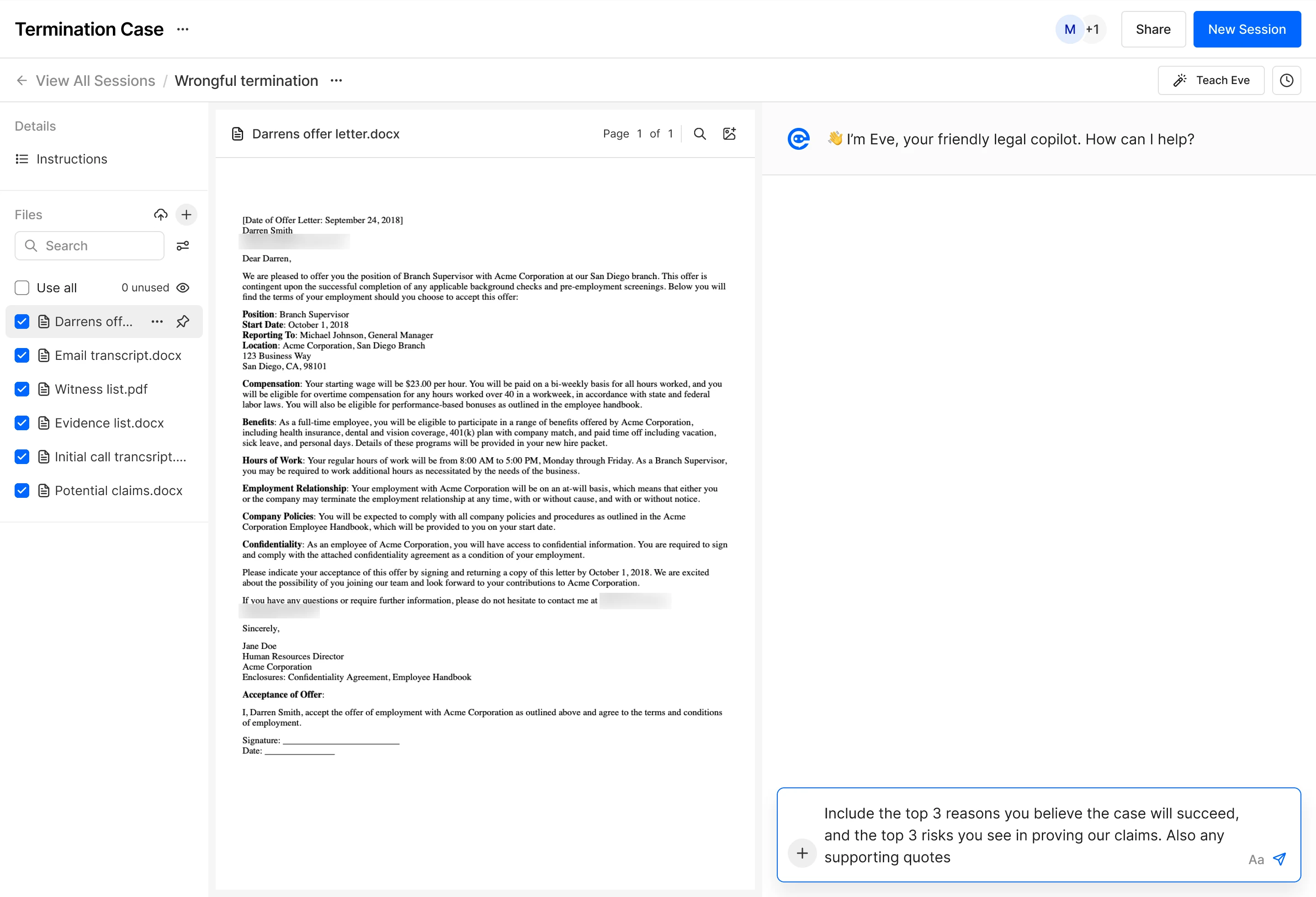
  • Darren's offer letter open beside the chat, with a question about the case's strengths and risks typed in
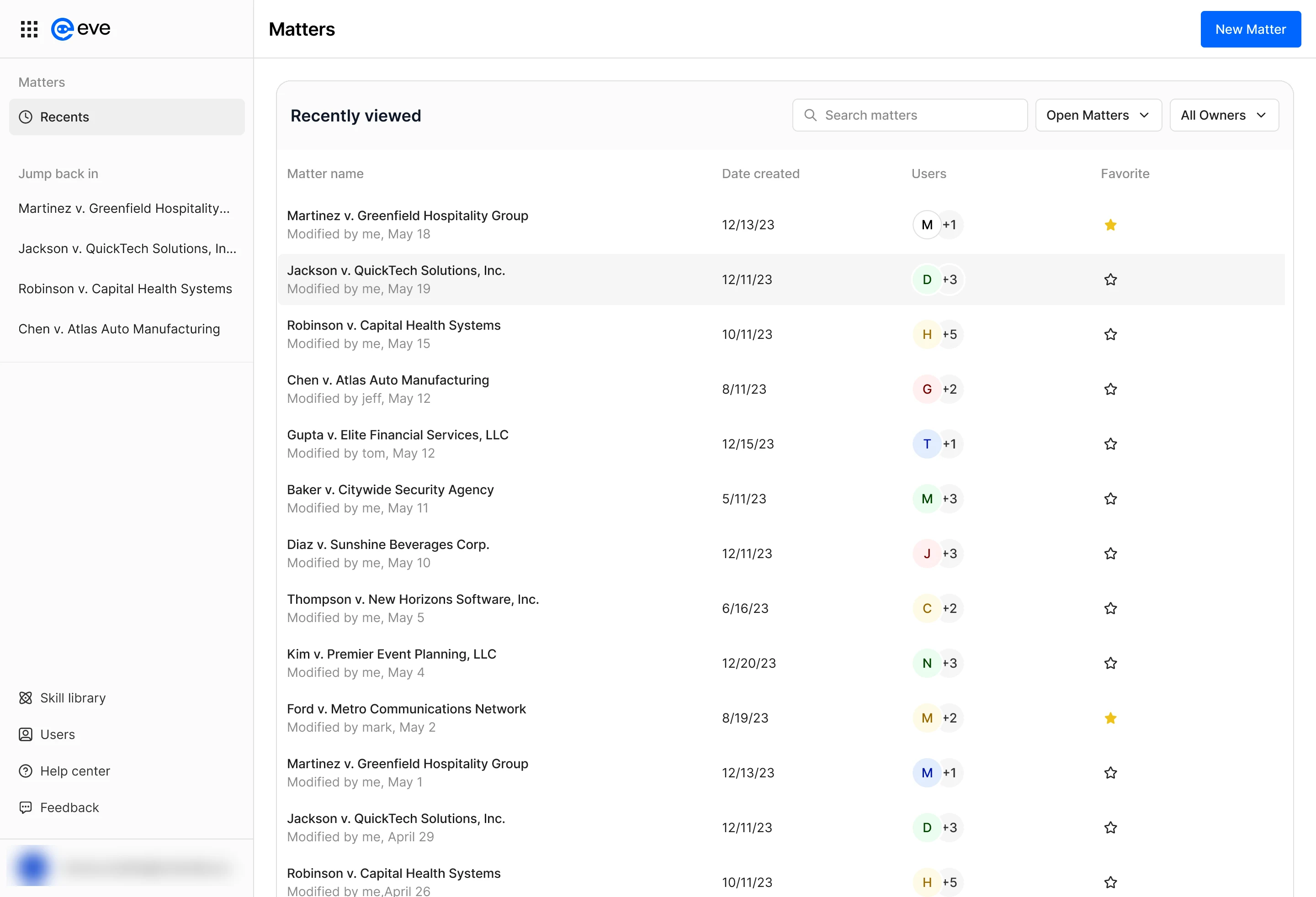
  • Matters with a Jump back in list of recent matters in the sidebar, beside the Recently viewed table.
  • Firm-wide Activity with an overdue task opened in place, showing its matter, owner, due date and lifecycle.
Darren’s offer letter open beside the chat; Matters with a Jump back in list of recent matters in the sidebar; firm-wide Activity with an overdue task opened in place.

What I learned

Stay close to the customer.

Homepage and Activity both started from what we heard on customer calls. The audit caught what calls couldn’t: the same thing built three different ways.

Design for the whole spectrum.

Chat first worked because a chat box met everyone where they were, from people new to software to power users. Every feature after it had to do the same.

Follow the problem, not the page.

When the homepage didn’t lift adoption, we didn’t redesign it again. We built a new Activity page instead, and matched the firm list to the matter list so the experience stayed cohesive and measurable.